Stop overbuilding your AI backend

My #1 rule:
Deploy the boring loop first. Add intelligence later.
Because if the simple loop doesn't work in production, the fancy version won't save you.
Your vibe-coded AI app does not need a complicated backend on day one.
🙅♀️ No RAG
🙅♀️ No tools
🙅♀️ No streaming
🙅♀️ No multi-agent orchestration
It needs one boring backend loop:

That's it.
The minimal backend loop
Your first production backend needs five steps and nothing else:
- Receive the message
- Check who the user is
- Call the AI provider
- Save the result
- Return the response
In practice, that's three Lambda functions:
get_chat.py→ loads a single chat with its full message historyget_chats.py→ populates the sidebar list of conversationssend_message.py→ creates the chat if new, stores the user message, calls the AI, stores the reply
Here's what that looks like as a complete backend:

Each AWS service has exactly one job:
- API Gateway is the front door
- Cognito checks that the request comes from an authenticated user
- SSM stores the AI API key
- DynamoDB stores the chat history
- Lambda connects the pieces
The full request flow
Here's every hop a message makes from browser to AI provider and back:
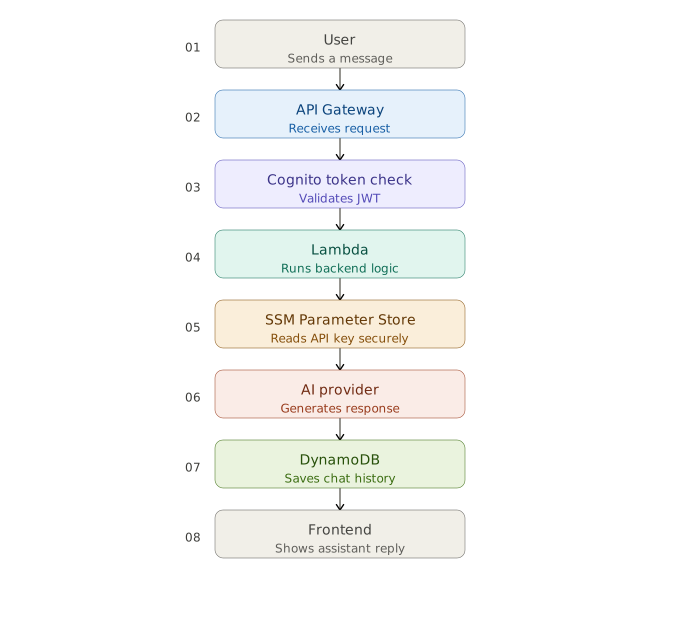
Click any step to go deeper:
The user types a message in the frontend, which is a React app hosted on AWS Amplify. When they hit send, the client makes a POST request to your API Gateway endpoint with the Cognito JWT from the current session in the Authorization header.
Why this matters → The request originates from the browser. No AWS services are involved yet. This is pure client-side JavaScript.
API Gateway is your public HTTPS endpoint. It receives the POST, routes it to the right Lambda integration and manages throttling, CORS headers plus stage variables.
Why this matters → Acts as the front door. Nothing hits Lambda directly. All traffic is funneled through here, giving you one place for rate limiting and auth enforcement.
Before the request ever reaches your Lambda, API Gateway runs a Cognito Authorizer. It verifies the JWT signature against your Cognito User Pool's public keys and checks the token hasn't expired. If validation fails, API Gateway returns a 401 immediately. Lambda never runs.
Why this matters → Auth at the edge. You never pay for Lambda execution on unauthenticated traffic. Your business logic stays clean because Lambda does not need manual token verification.
Lambda is the core of your backend. It parses the request body, identifies the user from the authorizer context, fetches conversation history from DynamoDB and orchestrates the calls to SSM plus the AI provider.
Why this matters → Serverless means you pay per invocation, not per idle hour. Lambda scales from zero to thousands of concurrent executions without any infrastructure management.
Lambda calls SSM Parameter Store to retrieve your AI provider's API key. The key is stored as a SecureString, encrypted with KMS. It is never hardcoded in environment variables or source code.
Why this matters → Secrets management done right. SecureStrings are encrypted at rest and in transit. IAM policies control exactly which Lambda functions can read each parameter, so access stays narrow.
Lambda sends the conversation history and the new message to an AI provider like OpenAI or Anthropic using the API key from SSM. The provider streams or returns the completion.
Why this matters → Lambda handles the API call directly. The AI provider stays behind your backend, so the browser never sees your API key.
After receiving the AI response, Lambda writes the new user message and assistant reply to a DynamoDB table keyed by userId with a timestamp-based sort key. This becomes the conversation history for future turns.
Why this matters → DynamoDB gives you single-digit millisecond reads at any scale. The chat history pattern maps naturally to its key-value model: userId as partition key, timestamp as sort key.
API Gateway returns the response to the browser. The React frontend receives the assistant's reply, updates state and renders it in the chat UI.
Why this matters → The round trip is complete. From user message to assistant reply, every service played its role. Each one is production-grade AWS infrastructure you own.
CLICK TO EXPAND · CLICK AGAIN TO CLOSE
Get the boring loop right first.
Everything else is optional.
My upcoming course Ship It walks through the full stack: frontend, backend, auth, database and deployment on AWS.
Join the waitlist:
If you'd rather walk through your specific app: what it does, where it lives and what it needs next Grab a free 30-min call ↗
I'll help you map it to the serverless AWS stack.