Day 5: Build your NAT Gateway (the back gate)

How to crate a NAT Gateway that lets private subnets access the internet securely (on-way traffic only)
Your back yard needs an exit
Day 4: You divided your VPC into front yards (public) and back yards (private)
Today: We build the back gate (NAT Gateway)
Here's the problem:
Your AI agent containers will live in the back yard (private subnet).
They need to:
- Pull Docker images from ECR
- Call OpenAI API
- Send audio to Twilio
But they have no direct internet access.
And you can't give them a public IP (that would defeat the purpose of private subnets)
Solution: NAT Gateway
Think of it like this:
Your back yard has no street access (secure)
But you need to order pizza (internet access)
So you build a small gate in the back fence
You can walk OUT to get pizza
But strangers can't walk IN through that gate
That's NAT Gateway: one-way traffic.
By the end of today, you'll have:
✅ NAT Gateway deployed
✅ Elastic IP attached (stable public address)
✅ Private subnets able to reach the internet
✅ Security maintained (no inbound access)
Let's build your back gate 🚪
What you'll build today
A NAT Gateway with:
| Component | Value | Purpose |
|---|---|---|
| Name | Fargate-NAT-Gateway | Your identifier |
| Elastic IP | Auto-allocated | Stable public address |
| Connectivity | Public | Routes to internet |
This allows:
✅ Private subnets → Internet (outbound)
❌ Internet → Private subnets (inbound blocked)
What you'll learn
- What a NAT Gateway is (and why you need it)
- How NAT enables one-way traffic
- Why NAT lives in public subnets
- What an Elastic IP is
- The difference between NAT Gateway and Internet Gateway
But if you want:
✅ Complete codebase (one clean repo)
✅ Complete walkthroughs
✅ Support when stuck
✅ Production templates
✅ Advanced features
Join the waitlist for the full course (launching February 2026):
Building something with AI calling?
Let's chat about your use case!
Schedule a free call ↗ - no pitch, just two builders talking.
Time required
10 minutes (mostly waiting for AWS to provision)
Prerequisites
✅ Completed Day 3 (VPC with Internet Gateway) ↗
✅ Completed Day 4 (4 subnets: 2 public, 2 private) ↗
✅ Access to AWS Console
Understanding NAT Gateway (3-minute primer)
What is NAT?
NAT = Network Address Translation
It's a networking technique that lets multiple devices share one public IP address.
In AWS: NAT Gateway lets your private subnet access the internet without having public IPs themselves.
Why you need NAT Gateway
Your AI agent containers live in private subnets.
They need internet access for:
- Pulling Docker images from ECR
- Calling OpenAI Realtime API
- Sending audio streams to Twilio
- Downloading dependencies
But they can't have public IPs (that would make them accessible from the internet).
NAT Gateway solves this:
All outbound. Zero inbound.
How NAT Gateway works
Think of it like your back yard gate:
Without NAT:
- Your back yard (private subnet) is completely isolated
- No way to leave (no internet access)
- AI agent container is stuck
With NAT:
- You add a small gate in the back fence
- You can walk out through the gate (internet access)
- But the gate is one-way → strangers can't walk in
- AI agent container can call OpenAI, but OpenAI can't call back in
Visual:
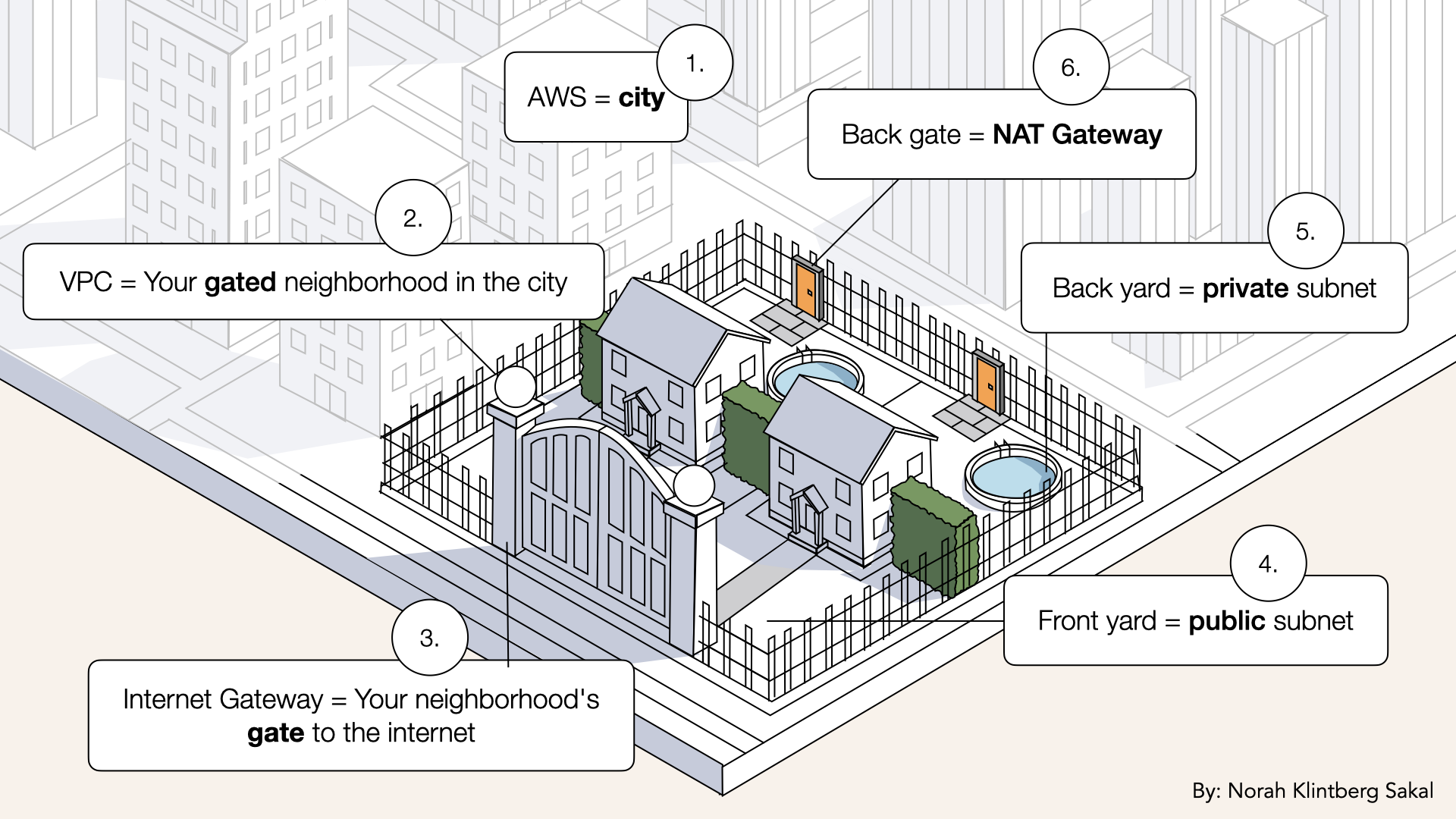
With NAT, you add a small gate in the back fence you can walk out through the gate (internet access) but the gate is one-way → strangers can't walk in
Key point: Traffic flows out though the back gate, but nothing can come in from the alley.
NAT Gateway vs Internet Gateway
You might be wondering: Don't we already have an Internet Gateway?
Yes! But they serve different purposes:
| Feature | Internet Gateway (IGW) | NAT Gateway |
|---|---|---|
| Lives in | VPC level | Public subnet |
| Allows | Bidirectional traffic | One-way (outbound only) |
| Used by | Public subnets | Private subnets |
| Security | Resources are exposed | Resources stay hidden |
| Example | Load balancer | AI agent containers |
Analogy:
- IGW = Gate to neighborhood (visitors can enter)
- NAT = Back gate (you can exit, but no one can enter)
Why NAT needs public access
NAT Gateway needs:
- Internet access (to forward requests)
- A public IP (Elastic IP)
In regional mode: AWS automatically manages this for you. You don't need to choose a public subnet, AWS places NAT resources where they need to be.
In zonal mode (old way): You had to manually select a public subnet.
Flow:
Private subnet → NAT gateway → Internet Gateway → Internet
The difference is just who sets it up: you (zonal) or AWS (regional).
Understanding Elastic IPs
What is an Elastic IP?
Elastic IP = A static public IP address in AWS
Key properties:
- Doesn't change (unlike normal public IP)
- You own it (until you release it)
- Can be attached to different resources
- Costs money if not attached to running resource
Why NAT needs an Elastic IP:
Without it, NAT Gateway's IP could change, breaking configurations.
With Elastic IP:
- Your NAT always has the same public IP
- External services can safelist that IP
- More reliable for production
In the old zonal mode, you had to manually allocate Elastic IPs.
Deep dive
With regional mode (what we're using):
✅ AWS allocates Elastic IPs automatically✅ One Elastic IP per availability zone
✅ You can see them in VPC → Elastic IPs (labeled with your NAT name)
✅ They're managed automatically, no manual work needed
You don't need to do anything with Elastic IPs. AWS handles it.
NAT Gateway costs
Pricing: (as of Dec 2025)
- $0.045 per hour (~$32.40/month)
- $0.045 per GB processed
For this tutorial:
- Running 24/7 for a month = ~$32
- Data processing (minimal during testing) = ~$1-2
Total: ~$35/month while NAT Gateway exists
Cost optimization: Delete NAT when not testing (~$32/month savings)
- Delete NAT Gateway when not actively testing
- You can recreate it anytime (you'll get a new Elastic IP)
- Just remember to update route tables if you delete/recreate
Step 1: Create NAT Gateway
AWS recently simplified NAT Gateway setup with regional availability mode, no need to manually allocate Elastic IPs or choose subnets.
Now let's create the NAT Gateway.
Open the AWS Console ↗In the search bar at the top, type VPC and click VPC from the dropdown:
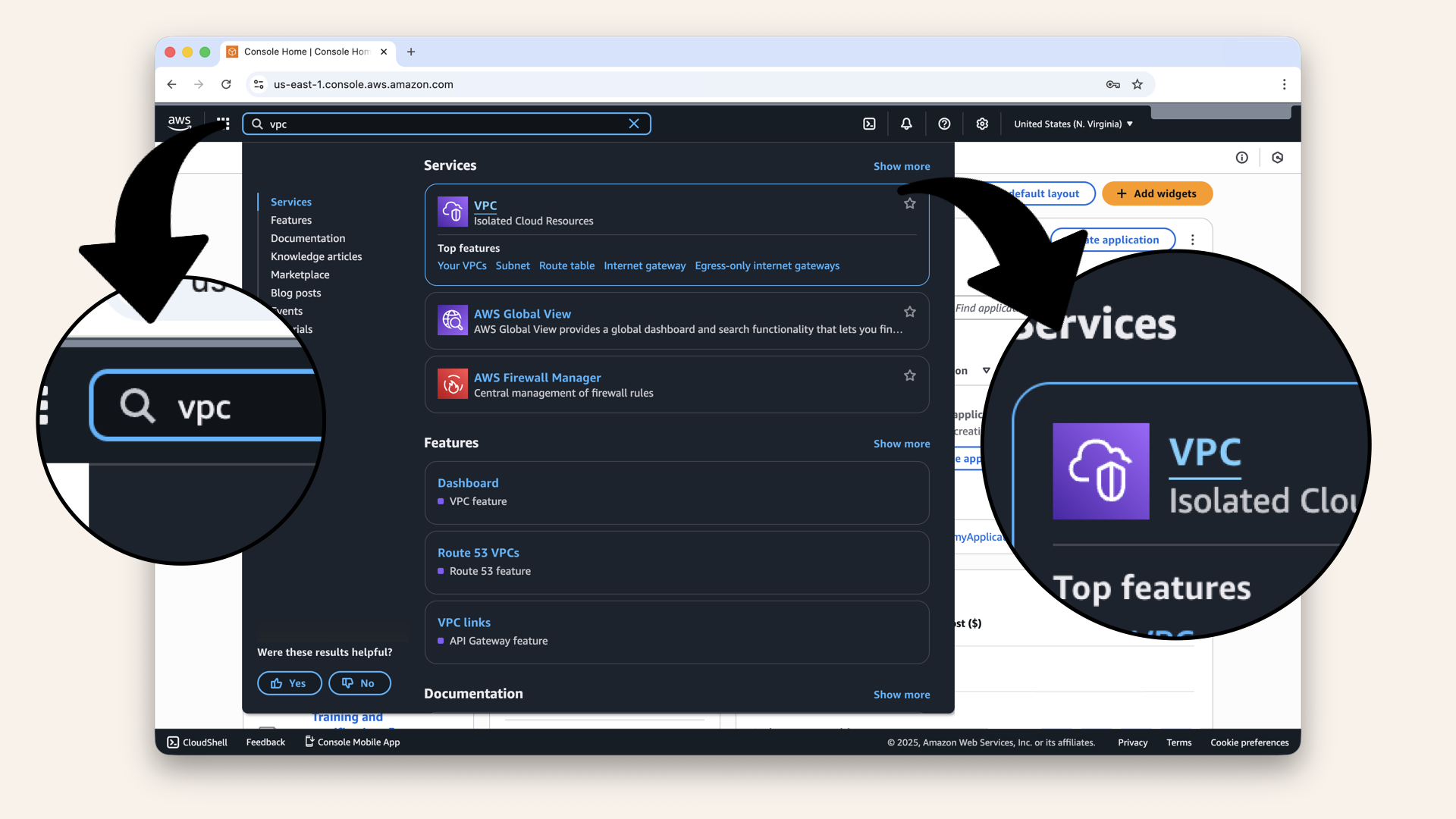
In the search bar at the top, type VPC and click VPC from the dropdown
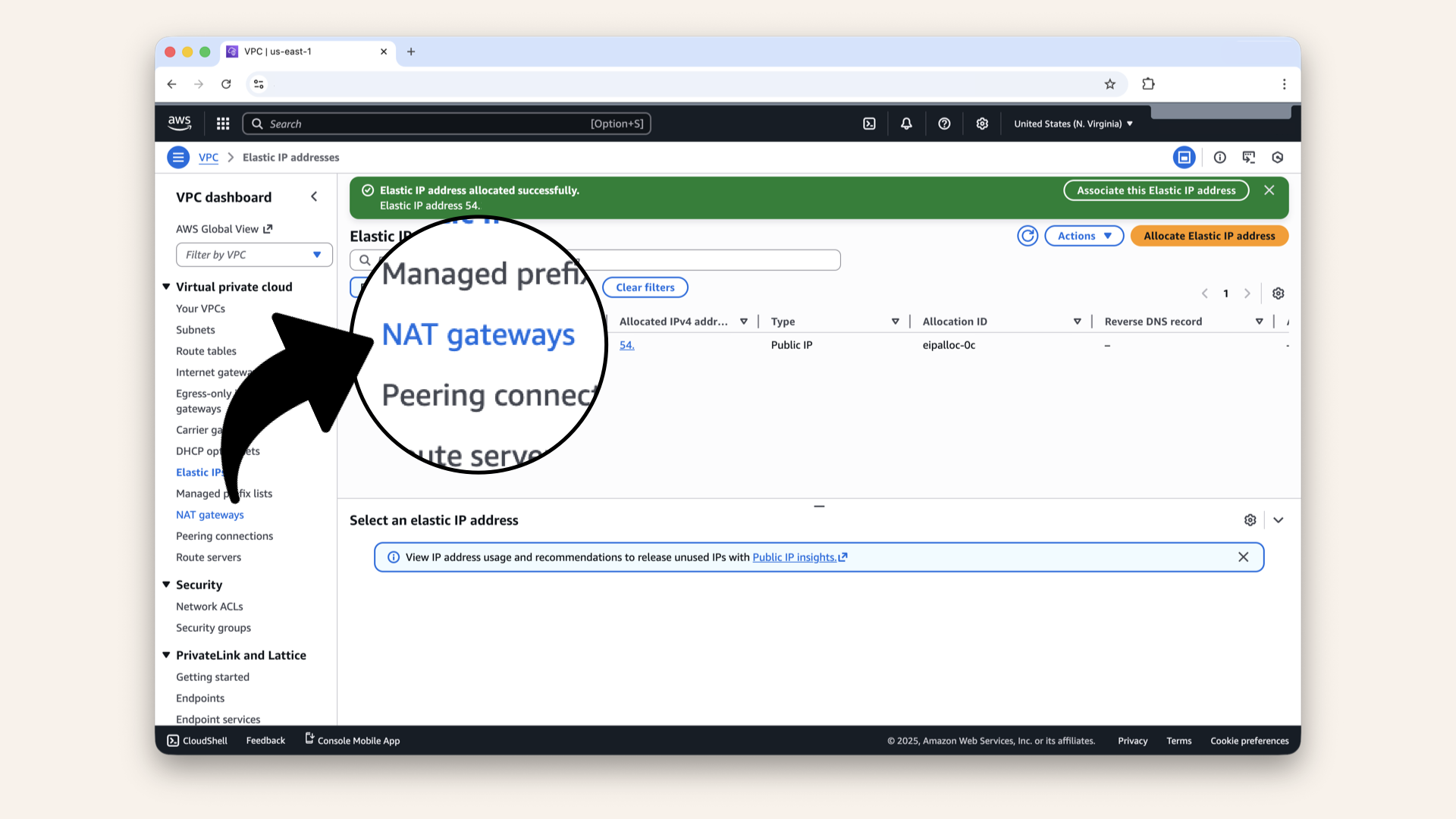
Click NAT Gateways in the left menu
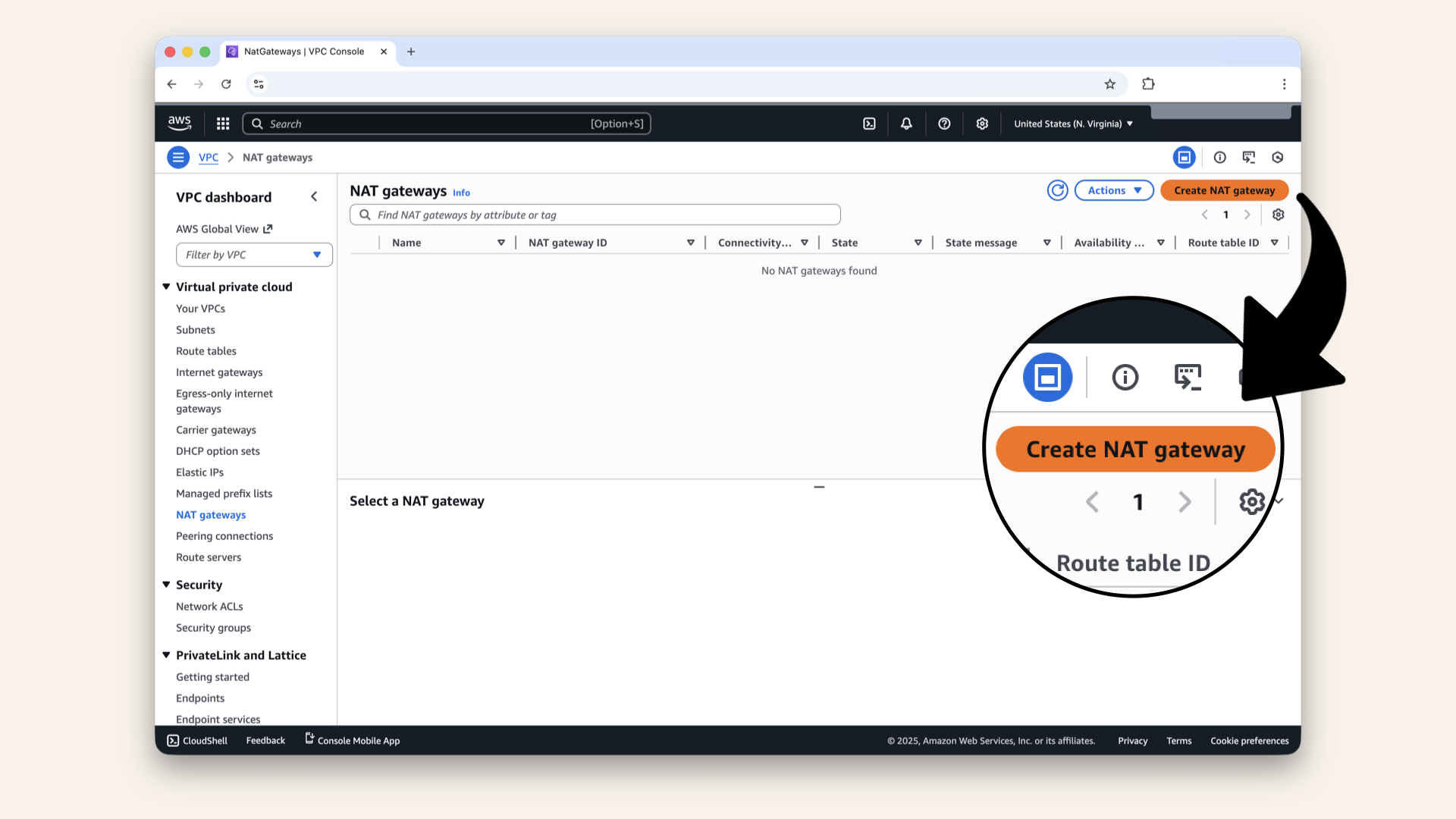
Click Create NAT gateway
Fill in the settings:
| Field | Value | Why |
|---|---|---|
| Name | Your identifier | |
| Availability mode | Regional (default) | Automatic high availability across all AZs |
| VPC | Select your VPC from drop down | The VPC we created on Day 3 |
| Connectivity type | Public (default) | Needs internet access |
| Method of Elastic IP (EIP) allocation | Automatic | AWS manages Elastic IPs automatically |
Name your NAT Gateway:
Type in the Name field.
Select your VPC from the dropdown:

Select your VPC from the dropdown
Verify settings:
- ✅ Availability mode: Regional
- ✅ Connectivity type: Public
- ✅ Method of Elastic IP (EIP) allocation: Automatic
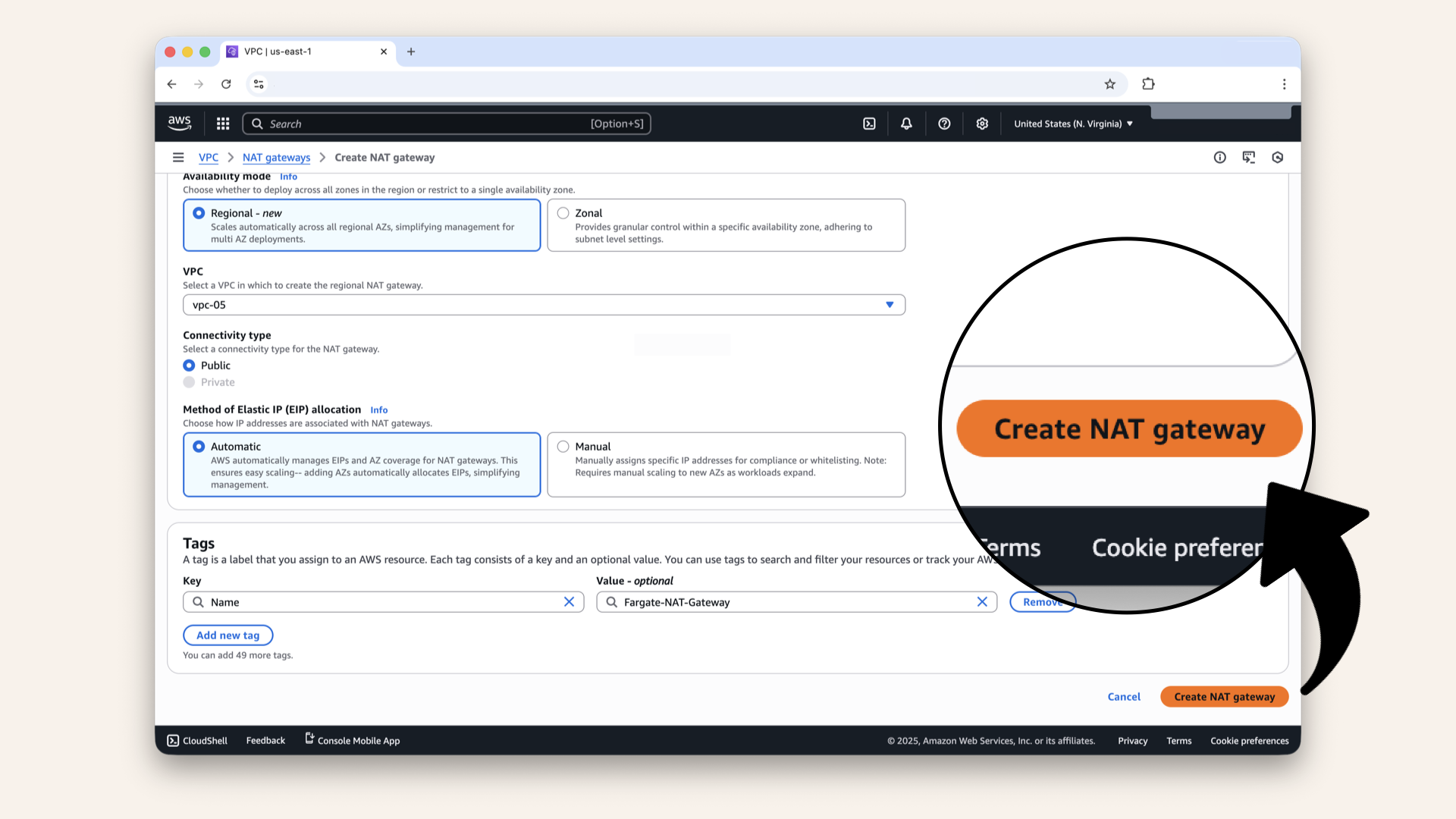
Click Create NAT gateway
AWS just simplified NAT Gateway setup with regional availability mode.
Learn what changed
What changed:
Old way (Zonal):
❌ Create NAT in each availability zone manually❌ Allocate Elastic IP for each NAT
❌ Update route tables when adding new AZs
❌ More complex, more steps
New way (Regional): ← We're using this
✅ One NAT Gateway automatically spans all AZs✅ Elastic IPs managed automatically
✅ Scales automatically as workloads expand
✅ Simpler setup, better high availability
Why we're teaching regional mode:
This is how AWS recommends setting up NAT in 2025. It's simpler, more reliable, and costs the same.
Want to learn the old way? Check out AWS's migration guide, but for new projects, regional mode is the way to go.
Read more: AWS NAT Gateway Regional Availability Announcement ↗
✅ You should now see: "Fargate-NAT-Gateway was created successfully":

You should see: "Fargate-NAT-Gateway was created successfully"
Step 2: Wait for NAT Gateway to become Available
NAT Gateway takes 2-3 minutes to provision.
Refresh the page until State changes from Pending to Available:
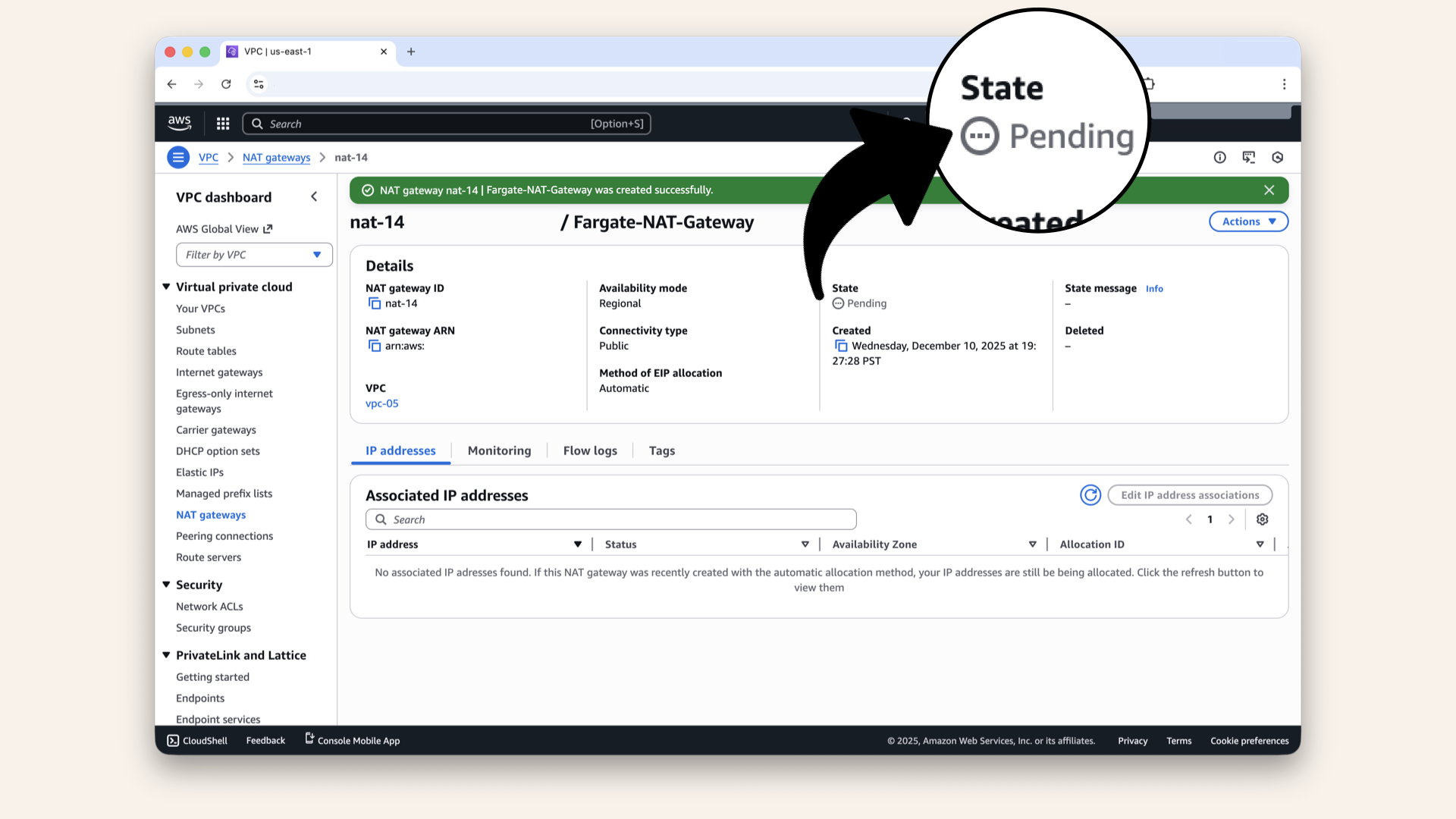
NAT Gateway takes 2-3 minutes to provision
When it shows Available:
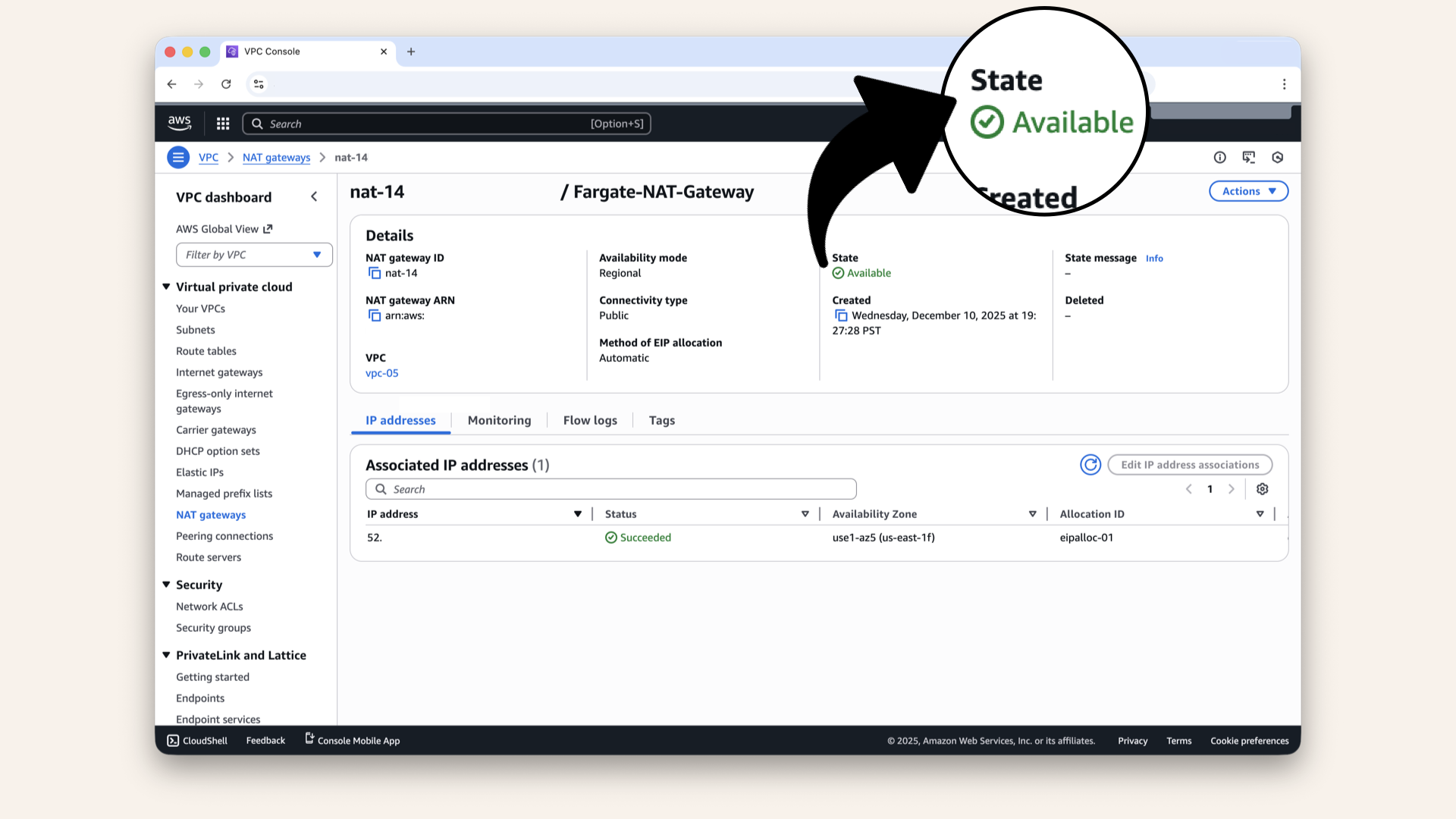
When it shows Available, your NAT Gateway is ready
✅ Your NAT Gateway is ready!
Step 3: Verify NAT Gateway details
Verify these details:
| Field | Expected Value |
|---|---|
| State | Available |
| Availability mode | Regional |
| Connectivity type | Public |
| Method of EIP allocation | Automatic |
| VPC | Your VPC |
| Elastic IPs | One or more (automatically allocated) |
If all these look good → you're done with NAT setup.
With regional mode, AWS automatically allocates Elastic IPs as needed. You'll see them in the Elastic IPs section of the VPC console, labeled with your NAT Gateway name.
Why this matters: You don't need to manually create or manage them. AWS handles the lifecycle automatically.
✅ Today's win
If you completed all steps:
✅ NAT Gateway created with regional availability
✅ Status shows Available
✅ Elastic IP allocation is automatic
You just built the back gate.
Tomorrow, we'll create the roads (route tables) that actually send traffic though this gate.
Understanding what you built
Let's visualize your VPC now:
With NAT, you added a small gate in the back fence you can walk out through the gate (internet access) but the gate is one-way → strangers can't walk in
What you have:
✅ Internet Gateway (neighborhood gate)✅ NAT Gateway (back gate)
✅ Public subnets (connected to IGW)
✅ Private subnets (ready to use NAT)
What you don't have yet:
❌ Routes connecting private subnets → NAT (Day 6)❌ Security rules (Day 7)
❌ Load balancer (Day 9)
We're building piece by piece.
NAT Gateway costs
NAT Gateway is NOT free tier eligible.
Pricing: (as of Dec 2025)
- $0.045 per hour (~$32.40/month)
- $0.045 per GB processed
For this tutorial:
- Running 24/7 for a month = ~$32
- Data processing (minimal during testing) = ~$1-2
Total: ~$35/month while NAT Gateway exists
- Delete NAT Gateway when not actively testing
- You can recreate it anytime (you'll get a new Elastic IP)
- Just remember to update route tables if you delete/recreate
If you're following this tutorial and not actively testing:
- Delete the NAT Gateway
- Recreate it when you need it (5 minutes)
- This saves ~$32/month during idle periods
Troubleshooting
NAT Gateway stuck in "Pending" state
If NAT stays "Pending" for more than 10 minutes:
- Refresh the page
- Check VPC Console → Elastic IPs, you should see new EIPs being allocated
- Verify your VPC has an Internet Gateway attached
- Check AWS Service Health Dashboard for outages
- If still stuck after 15 minutes, delete and recreate
Common cause: Rarely, AWS provisioning can get stuck. Deleting and recreating usually fixes it.
Can't see Elastic IPs after NAT Gateway is created
If you don't see Elastic IPs allocated:
- Go to VPC → Elastic IPs
- Look for IPs tagged with your NAT Gateway name
- They might take 2-3 minutes to appear
- Regional mode allocates one EIP per AZ where you have workloads
This is normal: EIPs appear after NAT becomes "Available"
NAT Gateway showing "Failed" state
If NAT fails to create:
- Check if you've hit the Elastic IP limit (5 per region by default)
- Go to VPC → Elastic IPs and release any unused ones
- Verify your VPC has an Internet Gateway
- Check AWS account limits (NAT Gateway limit is usually 5 per AZ)
- Try creating again
To request limit increases: AWS Support Console → Service Quotas
Want to use zonal mode instead of regional?
If you prefer the old zonal mode:
- Allocate an Elastic IP first (VPC → Elastic IPs → Allocate)
- When creating NAT Gateway, select Availability mode: Zonal
- Select PublicSubnet-1 as the subnet
- Choose Manual for EIP allocation
- Select your allocated EIP when creating NAT
Why you might want zonal:
- More control over which subnet NAT lives in
- Specific Elastic IP requirements (whitelisting, compliance)
- You're following older tutorials
Why regional is usually better:
- Simpler setup
- Automatic high availability
- Automatic scaling
Tomorrow's preview
Today: you built the back gate (NAT Gateway)
Tomorrow (Day 6): We build the roads (route tables)
What we'll do:
Right now, your private subnets don't know about the NAT Gateway.
Tomorrow we'll:
- Create a route table for private subnets
- Add route:
0.0.0.0/0→ NAT Gateway - Associate
PrivateSubnet-1andPrivateSubnet-2with this table
This tells your AI agent containers: "When you need internet, use the back gate (NAT)"
It's like adding a GPS that says: "to leave the back yard, use the gate in back fence"
What we learned today
1. What NAT Gateway is
A managed AWS service that enables one-way internet access for private subnets
2. Why it is called "one-way"
Private resources can initiate connections out, but nothing can connect in
3. NAT vs Internet Gateway
- IGW = bidirectional (used by public subnets)
- NAT = one-way outbound (used by private subnets)
4. Regional vs Zonal NAT
- Regional (new): Automatic high availability, simpler setup
- Zonal (old): Manual setup, more control
5. What Elastic IPs are
Static public IP addresses that don't change, automatically managed in regional mode
The foundation is growing
Days 1-2: Local development (your laptop) ✅
Day 3: VPC (your territory) ✅
Day 4: Subnets (front yards vs back yards) ✅
Day 5: NAT Gateway (back gate) ← YOU ARE HERE ✅
Days 6-8: Routing & Security
Days 9-12: Load Balancer & DNS
Days 13-17: Deployment (Docker, ECS, production!)
Days 18-24: Features (API, frontend, polish)
Share your progress
Got your NAT Gateway running? Share it!
Twitter/X:
"Day 5: Built a NAT Gateway, my AI's back door to the internet. Private subnets stay hidden, but can still call OpenAI & Twilio. Following @norahsakal's advent calendar 🎄"
LinkedIn:
"Day 5 of building AI calling agents: Created a NAT Gateway for secure one-way internet access. My AI containers can reach OpenAI without being exposed to the internet. Networking is starting to make sense!"
Tag me! I want to celebrate your progress! 🎉
Want the full course?
But if you want:
✅ Complete codebase (one clean repo)
✅ Complete walkthroughs
✅ Support when stuck
✅ Production templates
✅ Advanced features
Join the waitlist for the full course (launching February 2026):
Want to discuss your architecture? Let's chat about your use case!
Schedule a free call ↗ - no pitch, just two builders talking.
Tomorrow: Day 6 - Route tables (build the roads) 🗺️
Read Day 6 ↗
See you then!
— Norah