Day 3: Create your VPC (AWS foundation begins)

How to create a Virtual Private Cloud (VPC) in AWS - your AI agent's private territory
Your AI agent needs a home
Days 1-2: Your AI caller agent ran on your laptop.
Today: We're moving it to the cloud
But before your AI caller agent can live in AWS, it needs a home: a private, isolated network where only your resources cab communicate.
That's what a VPC is.
What is a VCP?
Think of it like this:
AWS is a massive city with millions of buildings (servers)
A VPC is your gated neighborhood in that city
Only you control who gets in, who gets out and what happens inside
Here's a visual:

A Virtual Private Cloud VPC is your own private cloud territory
By the end of today, you'll have:
✅ Your own private cloud territory
✅ A foundation for everything we build next
✅ Complete control over your network
What you'll build today
A Virtual Private Cloud (VPC) with:
✅ Your own IP address range (172.31.0.0/16)
✅ Isolated from all other AWS users
✅ Ready for subnets, security groups and more
This takes 5 minutes to set up, but it's the foundation for Days 4-24.
You might be thinking: "Can't we just deploy the code first?"
No. Here's why;
Without a VPC:
❌ Your AI agent has no place to run
❌ No security boundaries
❌ No control over traffic
With a VPC:
✅ Complete network isolation
✅ You control all access
✅ Production-ready security
We're building the foundation first, then putting the AI on top.
What you'll learn
- What a VPC actually is (and why you need one)
- How IP address ranges work (CIDR blocks)
- Why we use
172.31.0.0/16 - How to navigate the AWS console
- The difference between default VPC and custom VPC
But if you want:
✅ Complete codebase (one clean repo)
✅ Complete walkthroughs
✅ Support when stuck
✅ Production templates
✅ Advanced features
Join the waitlist for the full course (launching February 2026):
Building something with AI calling? Let's chat about your use case! Schedule a free call ↗ - no pitch, just two builders talking.
Time required
5 minutes
Prerequisites
1. An AWS account
Log in to console.aws.amazon.com ↗
That's it. No code today. Just infrastructure.
Understanding VPCs (2-minute primer)
Before we create one, let's understand what a VPC actually is.
What is a VPC?
VPC = Virtual Private Cloud
It's a logically isolated section of AWS where you launch resources like:
- Servers (EC2, Fargate)
- Databases (RDS, DynamoDB)
- Load balancers (ALB)
Key point: Resources in your VPC are isolated from other AWS users.
Why do you need a VPC?
Without a VPC:
- Your AI agent runs on a shared network
- Anyone could potentially access it
- No control over traffic flow
With a VPC:
- Your AI agent runs in your private network
- You control who gets in/out
- Production-grade security
It's like the difference between:
❌ Renting a desk in a shared office (no VPC)
✅ Owning your own office building (VPC)
What is a CIDR block?
CIDR = Classless Inter-Domain Routing
It'sa way to specify an IP address range.
Example: 172.31.0.0/16
What it means:
172.31.0.0= Starting IP address/16= How many IP addresses you get
Think of it like:
I want all IP addresses from
172.31.0.0to172.31.255.255
That's 64,536 IP addresses, more than enough for our AI calling agent.
Understanding CIDR notation
CIDR deep dive
| CIDR | # of IPs | Range Example |
|---|---|---|
/16 | 65,536 | 172.31.0.0 → 172.31.255.255 |
/20 | 4,096 | 172.31.0.0 → 172.31.15.255 |
/24 | 256 | 172.31.1.0 → 172.31.1.255 |
Rule of thumb:
- Smaller number (
/16) = more IPs - Larger number (
/24) = fewer IPs
For this tutorial, we use /16 because:
✅ Plenty of IPs for all our resources
✅ Easy to subdivide into subnets (Day 4)
✅ Standard practice for VPCs
Step 1: Go to the VPC console
Open the AWS Console ↗In the search bar at the top, type VPC and click VPC from the dropdown:
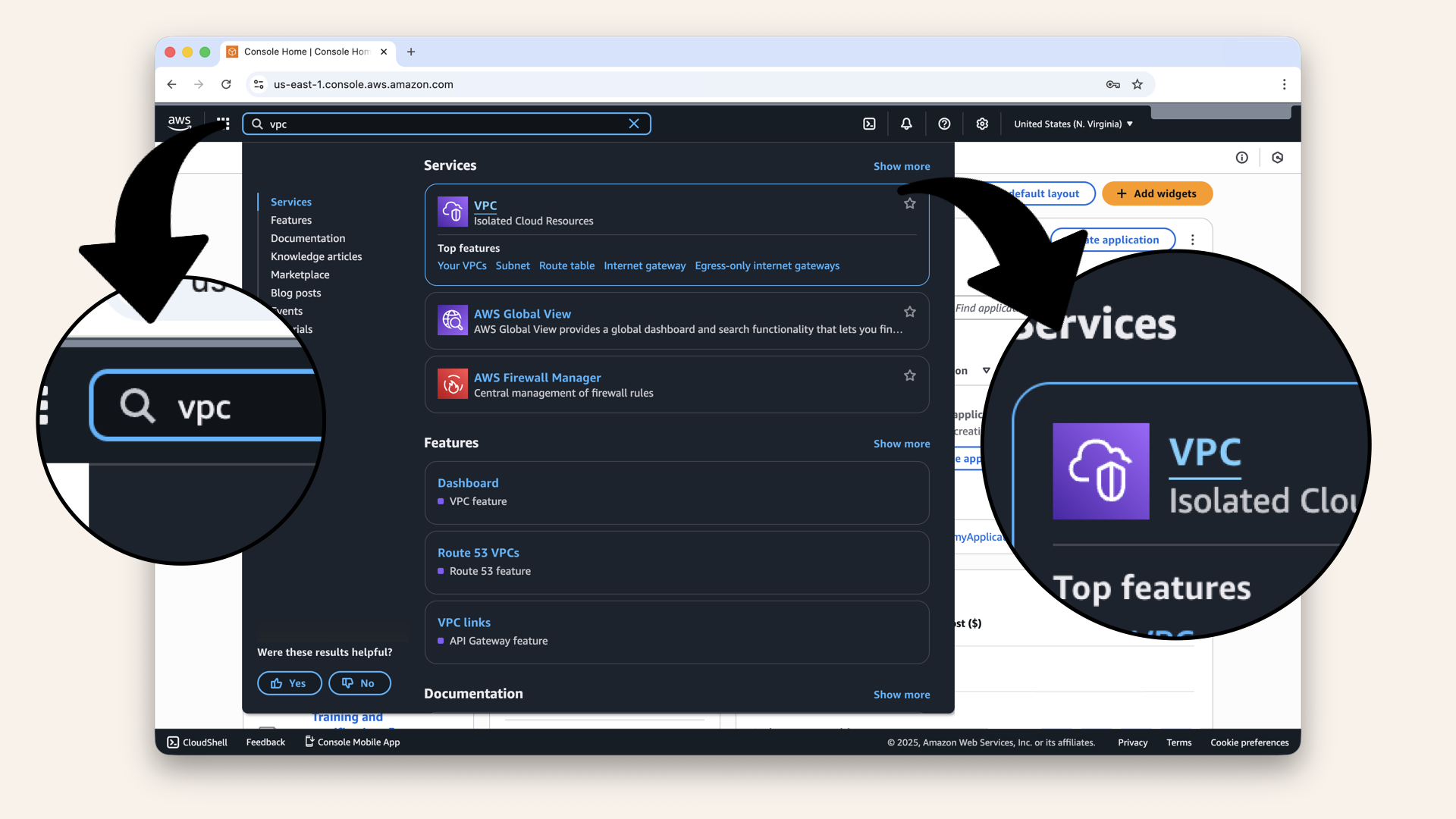
In the search bar at the top, type VPC and click VPC from the dropdown
You'll see the VPC dashboard:
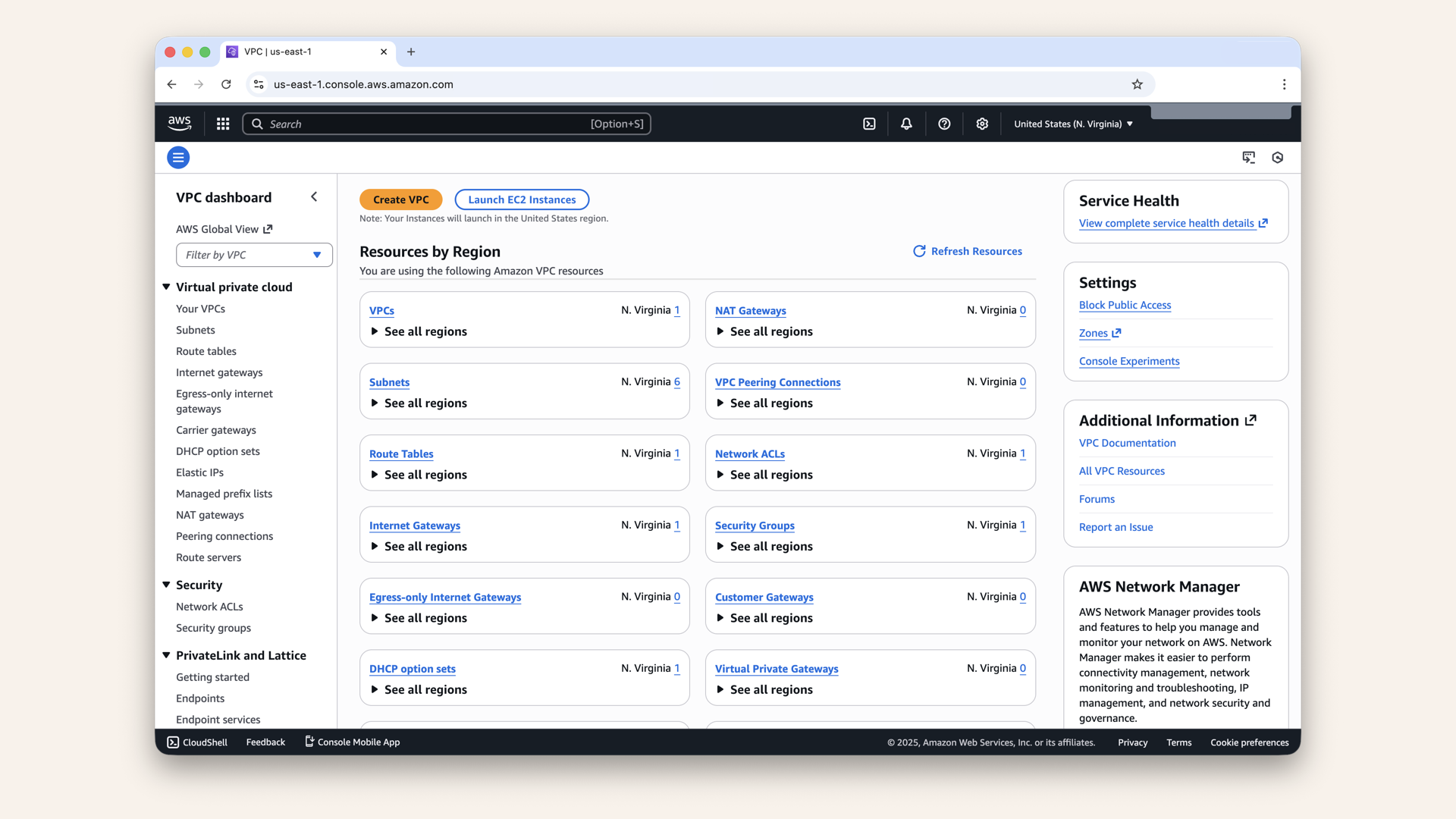
You'll see the VPC dashboard
Step 2. Check for default VPC
Click Your VPCs in the left menu: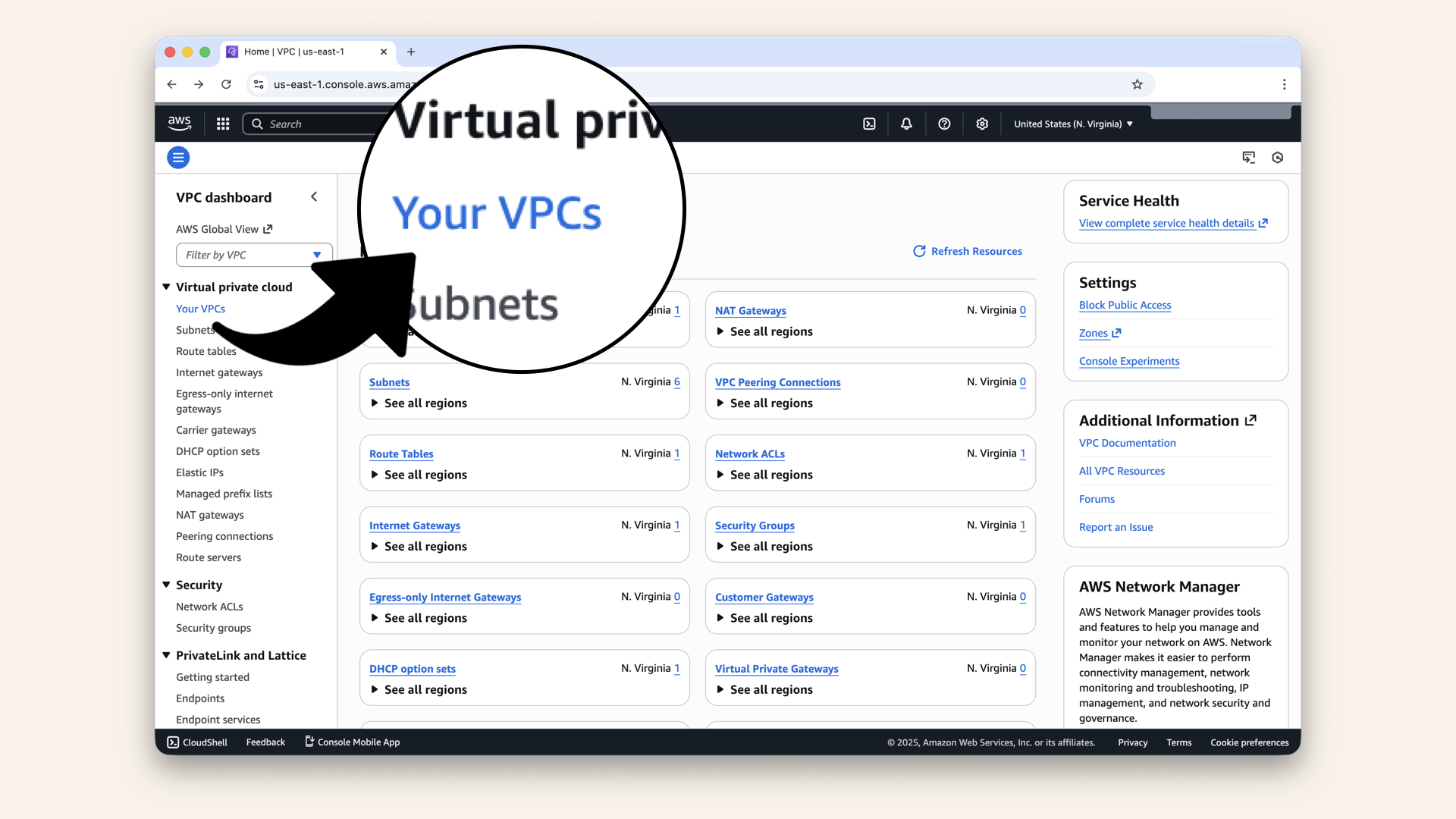
Click Your VPCs in the left menu
You should see one default VPC:
✅ One VPC with CIDR 172.31.0.0/16
✅ Status: Available
This is your default VPC.
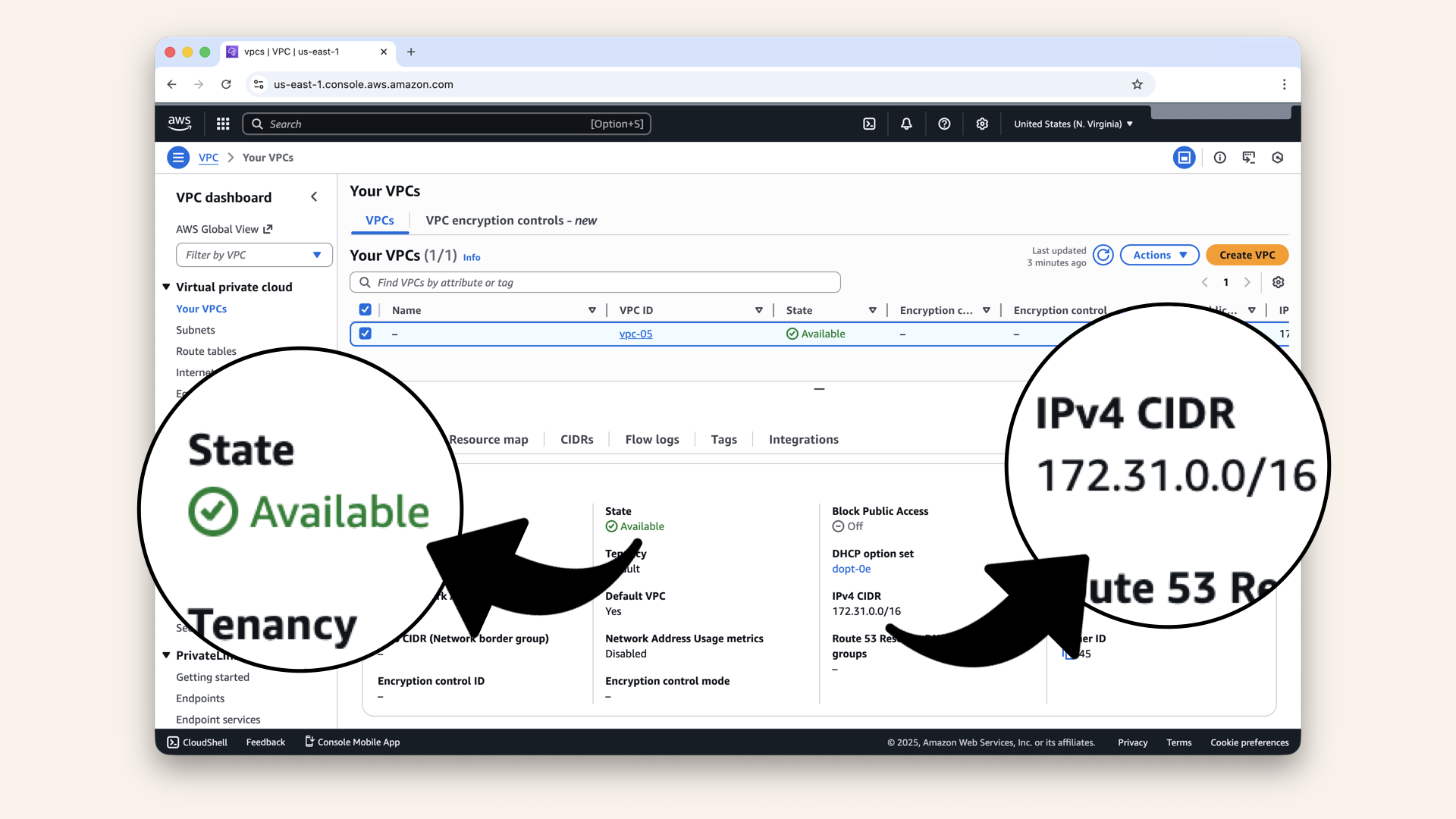
You should see one default VPC
For this tutorial, yes.
Why?
- Already exists
- Pre-configured with internet gateway
- Saves time
- Works perfectly for our AI calling agent
When would you create a custom VPC?
- Production systems with specific security requirements
- Multi-VPC architectures
- Compliance requirements
For learning? The default VPC is perfect.
Step 3: Verify your VPC
Click on your default VPC, you'll see the details: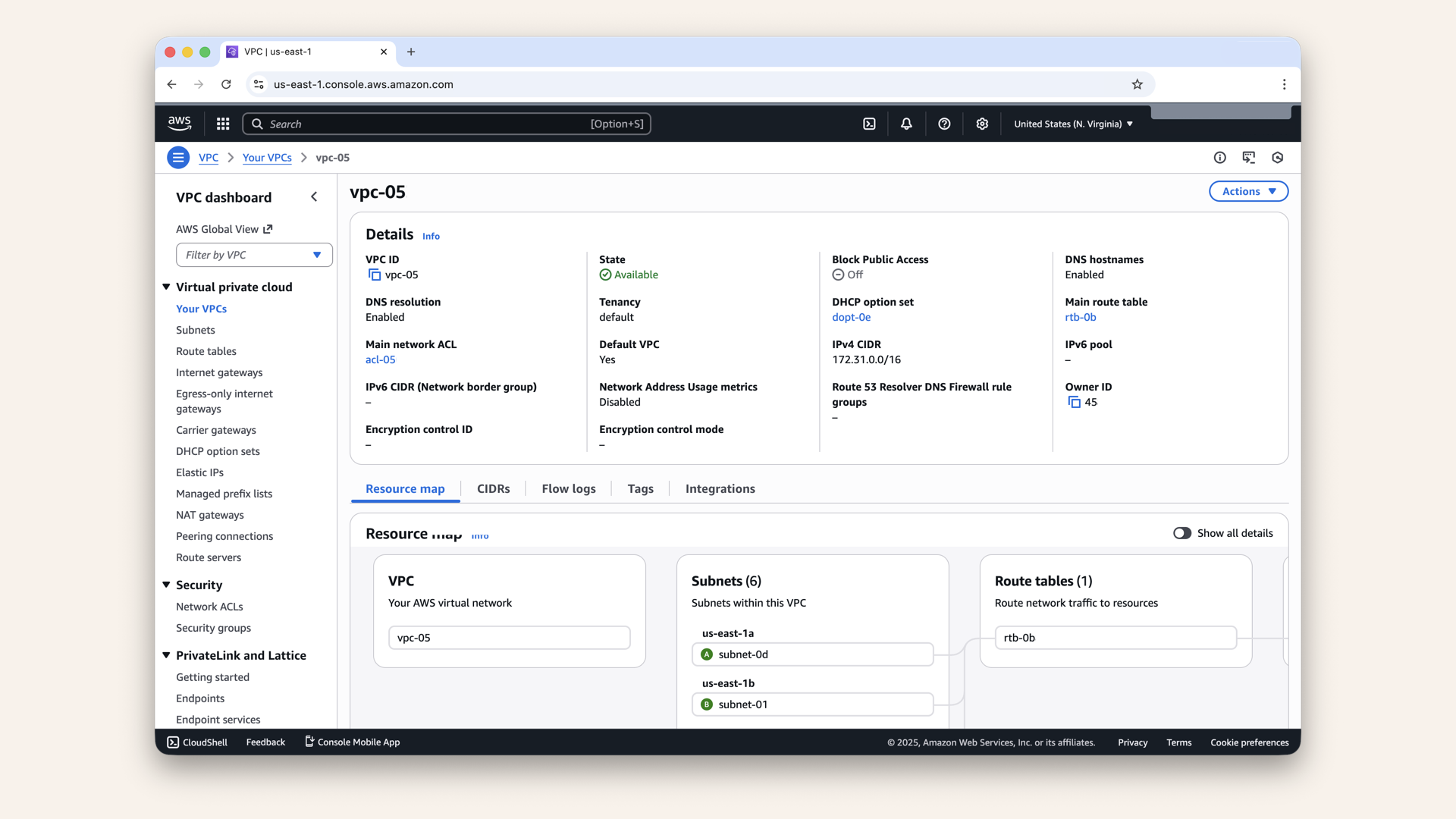
Click on your default VPC, you'll see the details
Confirm these settings:
| Setting | Value | Why |
|---|---|---|
| IPv4 CIDR | 172.31.0.0/16 | Your IP address range |
| Tenancy | Default | Shared hardware (cheaper) |
| DNS resolution | Enabled | Allows friendly domain names |
| DNS hostnames | Enabled | Resources get DNS names |
If you see all of these → you're good! ✅
Step 4: Verify internet gateway
Your VPC needs an Internet Gateway (IGW) to communicate with the outside world.
Click Internet Gateways in the left sidebar: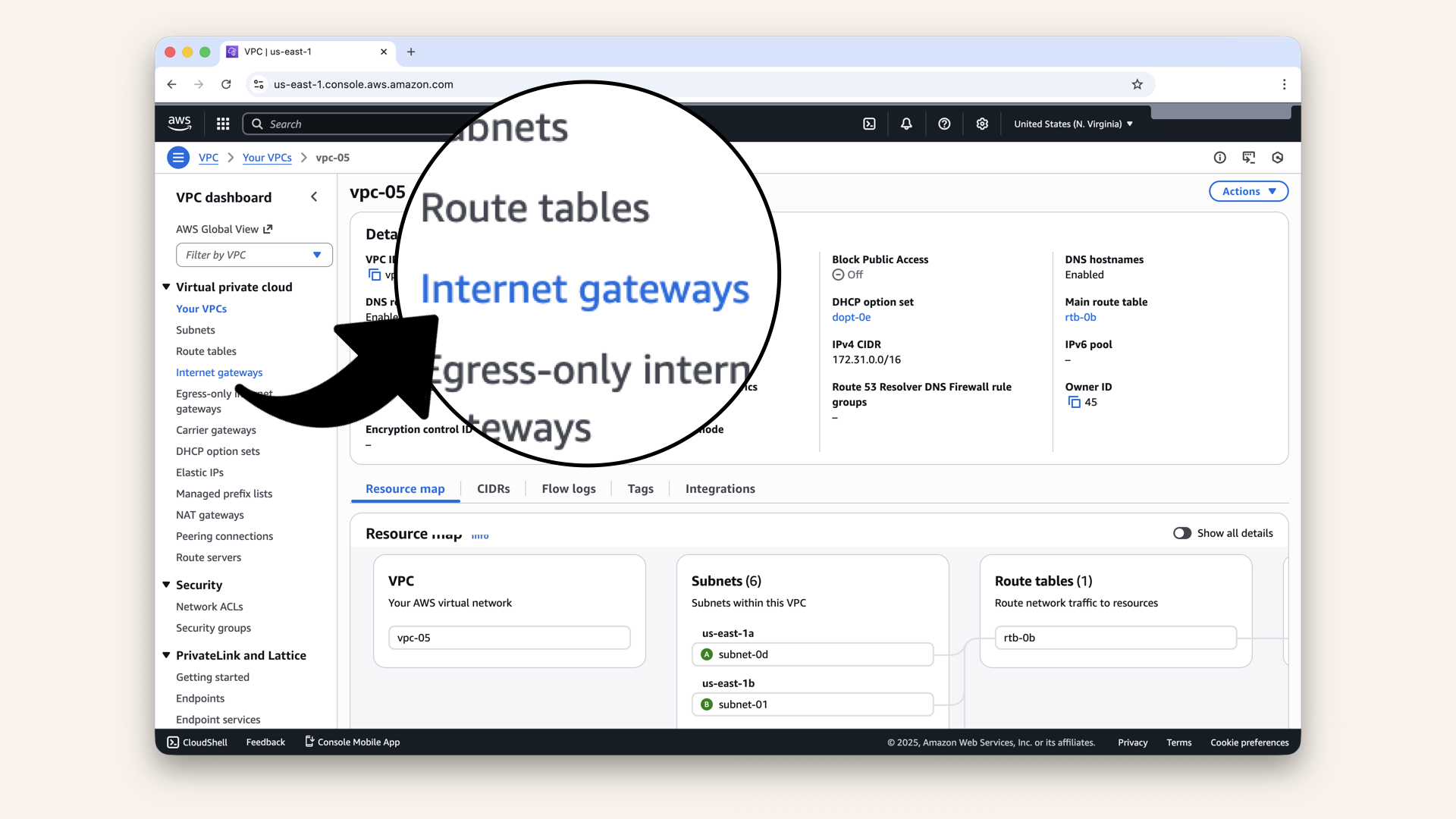
Click Internet Gateways in the left sidebar
You should see one Internet Gateway already attached to your VPC:
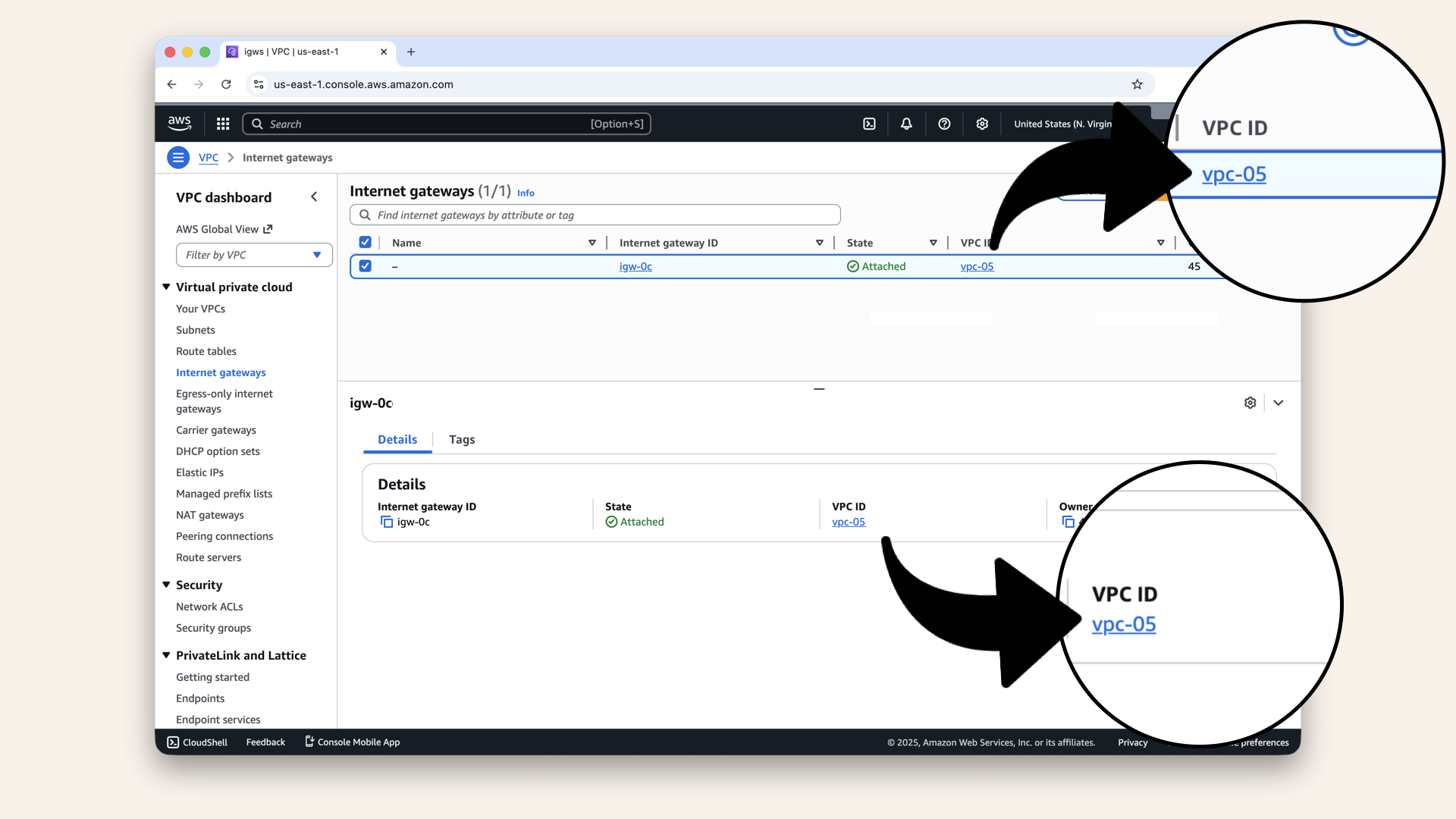
You should see one Internet Gateway already attached to your VPC
Confirm:
✅ State: Attached
✅ VPC ID: matches your VPC
This is what allows your AI agent to:
- Call Twilio
- Reach OpenAO
- Respond to phone calls
Without an IGW, your AI agent is isolated from the internet.
✅ Today's win
If you completed all the steps:
✅ You have a VPC 172.31.0.0/16
✅ It has an Internet Gateway attached
✅ DNS is enabled
✅ You can see it in the AWS Console
Tomorrow we'll divide this territory into neighborhoods (subnets).
Understanding what you build
Let's visualize what you have:
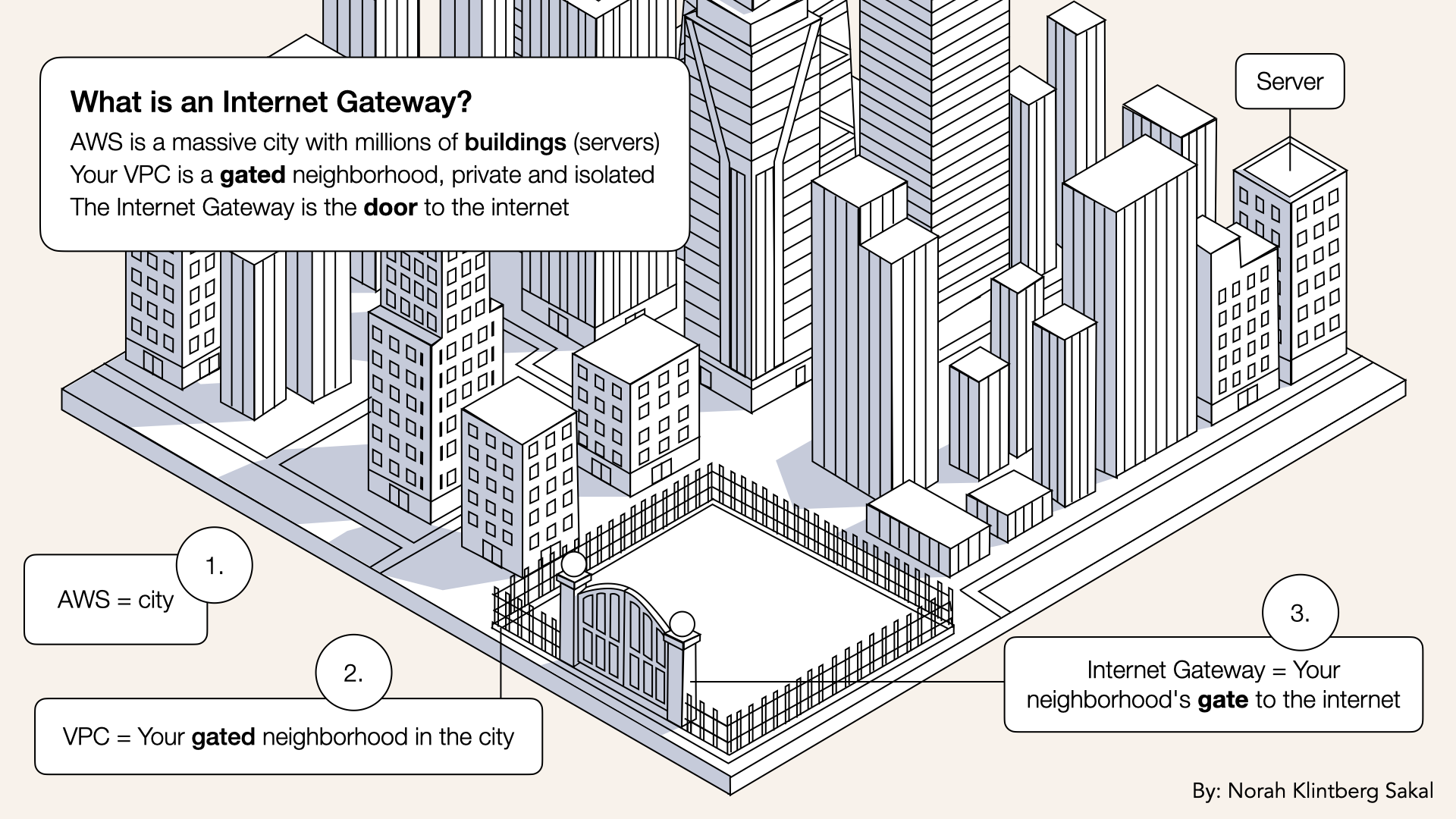
Internet Gateway = Your neighborhood's gate to the internet
What you have:
✅ A private network (VPC)
✅ A door to the internet (IGW)
✅ 65,536 IP addresses to use
What you don't have yet:
❌ Subnets (Day 4)
❌ Security rules (Day 7)
❌ Load balancer (Day 9)
❌ Running containers (Day 17)
We're building layer by layer, just like real infrastructure.
You might be wondering: "Why that specific IP range?"
Deep dive
Three common private IP ranges:
| Range | CIDR | Used For |
|---|---|---|
10.0.0.0/8 | 16.7 million IPs | Large corporate networks |
172.16.0.0/12 | 1 million IPs | AWS default VPCs |
192.168.0.0/16 | 65,536 IPs | Home networks |
AWS default VPCs use 172.31.0.0/16 because:
- It's a subset of the
172.16.0.0/12range - Unlikely to conflict with home networks
- Big enough for most projects
- Standard across all AWS accounts
Think of it like a phone area code: Everyone in your "area" (VPC) has the same prefix (172.31), but different endings (.X.X).
Troubleshooting
I don't see a default VPC
If you deleted your default VPC:
- Go to Your VPCs
- Click Actions → Create default VPC
- AWS will recreate it for you
- Wait 30 seconds
- Refresh the page
OR create a new custom VPC:
- Go to Your VPCs
- Click Create VPC
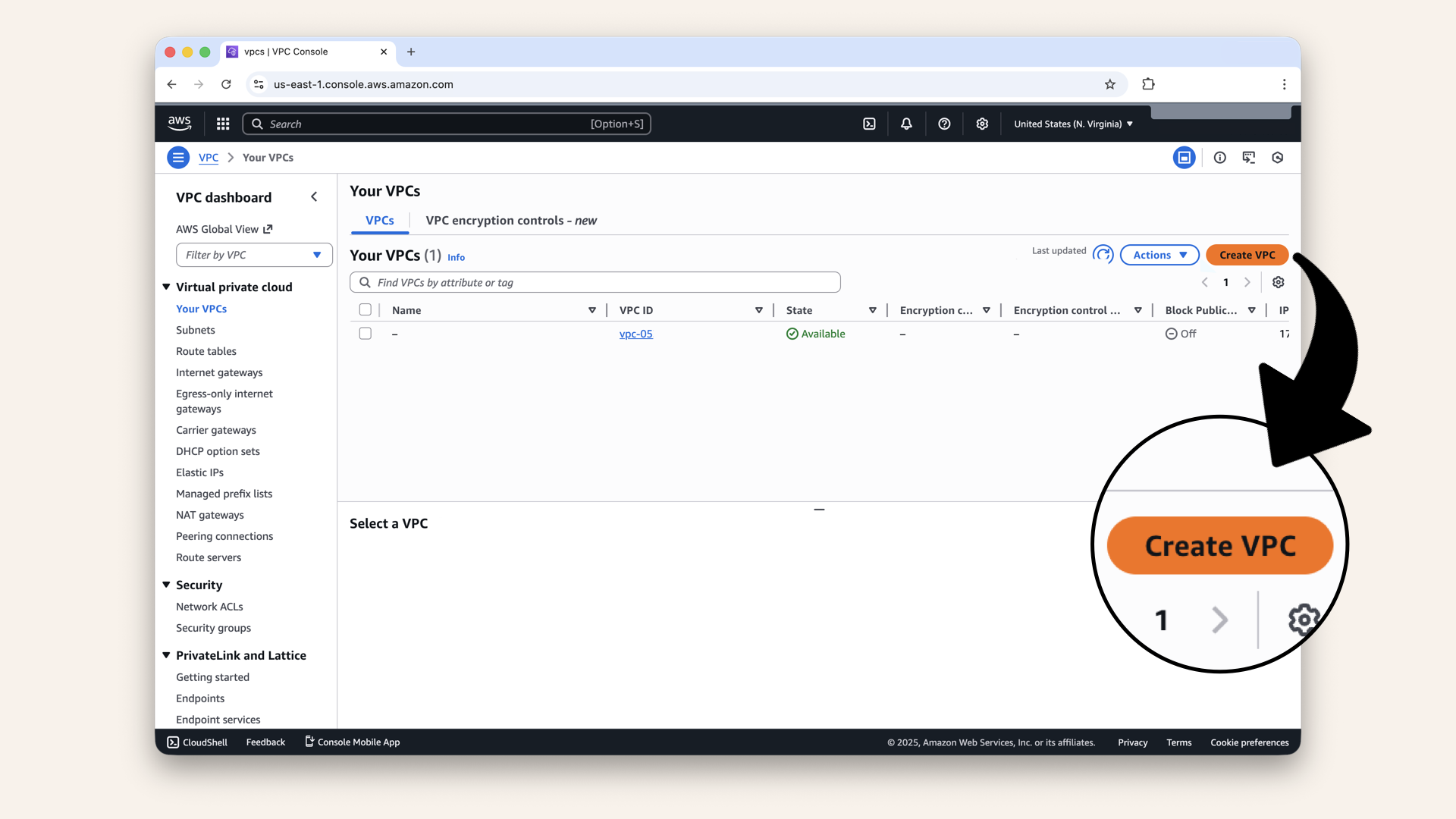
Click Create VPC
- Name:
my-ai-vpc - IPv4 CIDR:
172.31.0.0/16 - Click Create
No Internet Gateway attached
- Go to Internet Gateways
- Click Create internet gateway
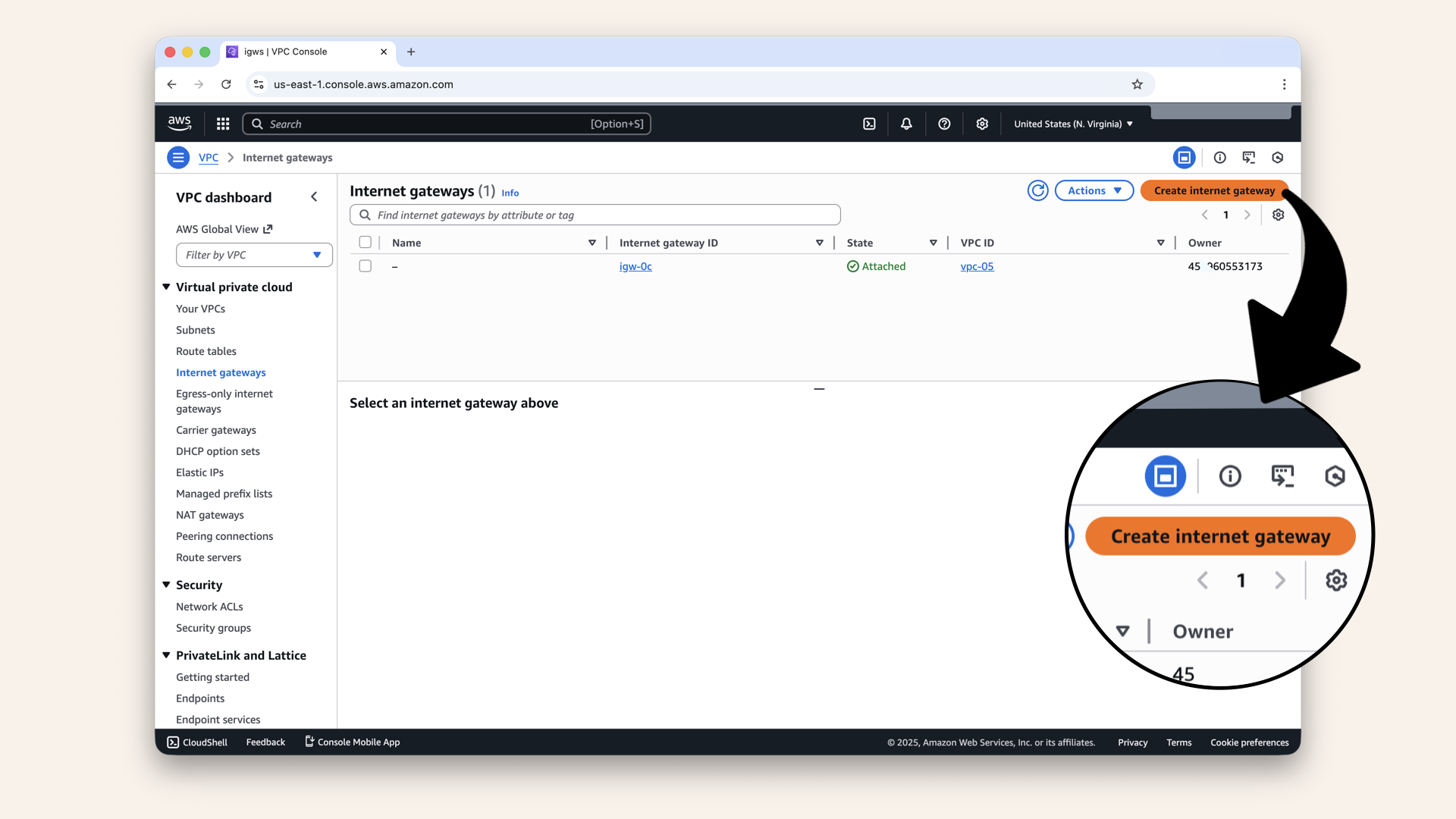
Create internet gateway
- Name:
my-igw - Click Create
- Select your new IGW
- Click Actions → Attach to VPC
- Select you VPC
- Click Attach
I'm in the wrong AWS region
Check the region in the top-right corner of the AWS Console:
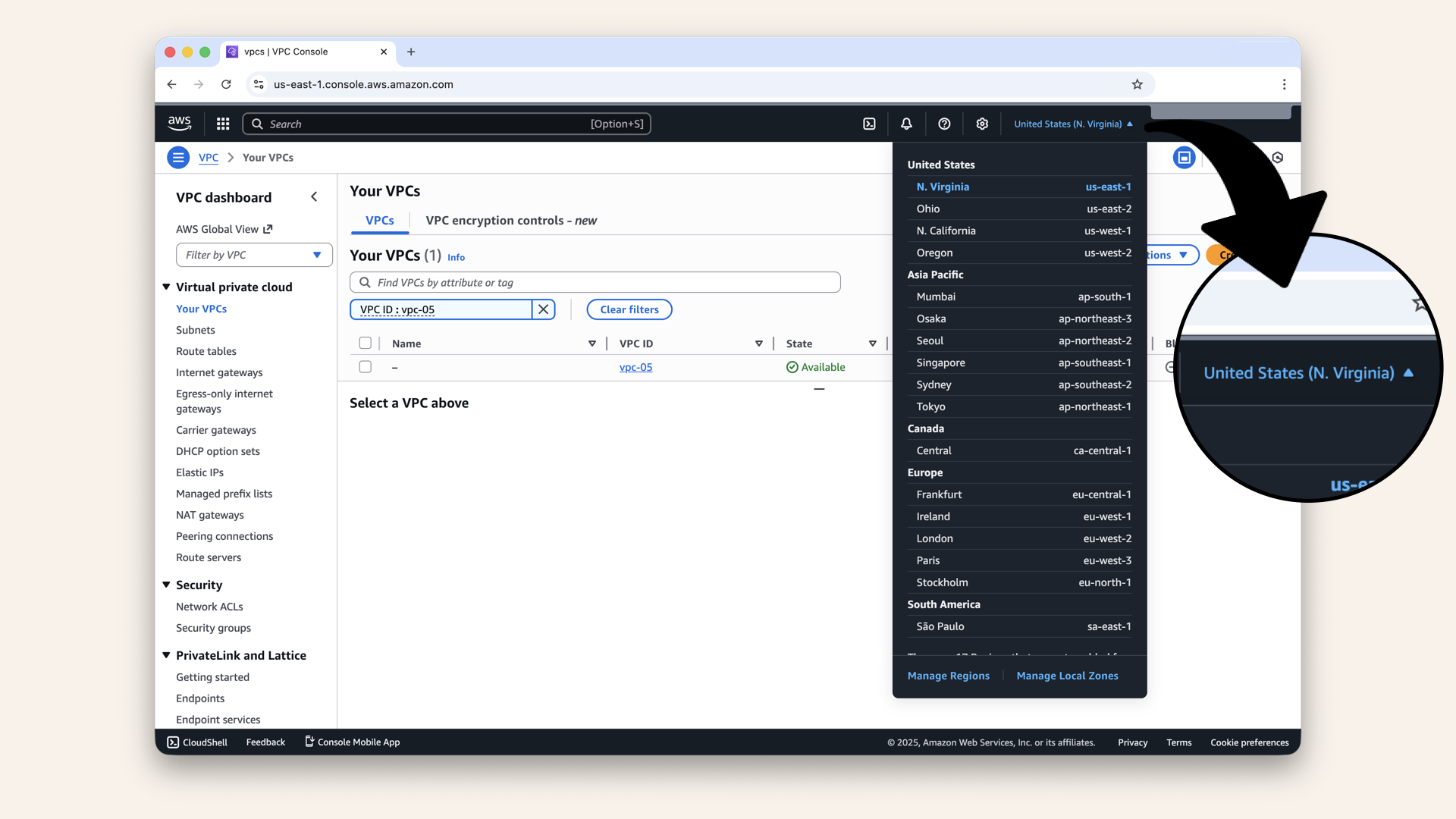
Check the region in the top-right corner of the AWS Console
For this tutorial, use: us-east-1 (N. Virginia)
To change:
- Click the region dropdown
- Select US East (N. Virginia)
- Refresh the VPC page
Tomorrow's preview
Today: You claimed your territory (VPC)
Tomorrow (Day 4): We divide it into neighborhoods
You'll create 4 subnets:
- 2 public (for the load balancer)
- 2 private (for your AI containers)
Each subnet will be in a different availability zone for high availability.
What we learned today
1. What a VPC is
A private, isolated network in AWS where your resources run:
A Virtual Private Cloud VPC is your own private cloud territory
2. What CIDR blocks mean
172.31.0.0/16 = Your IP address range (65,536 IPs)
3. Why Internet Gateways matter
Without one, your VPC can't reach the internet (no Twilio, no OpenAI):
Internet Gateway = Your neighborhood's gate to the internet
4. Default vs custom VPCs
Default VPCs work great for learning and small projects
The foundation is laid
Days 1-2: Local development (your laptop) ✅
Day 3: Infrastructure begins (VPC) ← YOU ARE HERE ✅
Days 4-8: Networking (subnets, routing, security)
Days 9-12: Gateway (load balancer, DNS, SSL)
Days 13-17: Deployment (Docker, ECS, production!)
Days 18-24: Features (API, frontend, polish)
By Day 24, your AI will run in THIS VPC, 24/7, handling real calls.
Share your progress
Got your VPC set up? Share it!
Twitter/X:
"Day 3: Created my VPC in AWS. My AI calling agent now has a home in the cloud. Following @norahsakal's advent calendar 🎄"
LinkedIn:
"Day 3 of building AI calling agents: Just set up my VPC in AWS. The foundation is laid. Ready for subnets tomorrow!"
Tag me! I want to see your progress! 🎉
Want the full course?
But if you want:
✅ Complete codebase (one clean repo)
✅ Complete walkthroughs
✅ Support when stuck
✅ Production templates
✅ Advanced features
Join the waitlist for the full course (launching February 2026):
Need help with deployment? Want to brainstorm your AI calling idea? Grab a free 30-min call ↗ - happy to help.
Tomorrow
Tomorrow: Day 4 - Create Subnets (Build Your Neighborhoods) 🏘️
We'll divide your VPC into public and private zones. Your load balancer gets the front yard, your AI gets the pool in back.
Read Day 4 ↗
See you then!
— Norah