Day 2: Teach your AI agent to call and book restaurants

How to give your AI agent a real job: call and book restaurant reservations
Give your AI agent a real mission
Yesterday, your AI agent called you and you had a basic conversation.
Today? We're giving it a real job: booking restaurant reservations.
By the end of today, your AI agent will:
✅ Call a phone number
✅ Act as your personal assistant
✅ Request a dinner reservation
✅ Handle follow-up questions
✅ Sound professional and polite
And you'll test it by answering the phone and roleplaying as the restaurant.
This is where it gets fun.
What you'll build today
A restaurant booking AI agent that:
✅ Greets restaurant staff professionally
✅ Requests "a table for 2 at 7pm tonight"
✅ Handles questions (like name, phone number, special requests)
✅ Confirms the booking
✅ Sounds like a real person
All with just a simple prompt change.
Yesterday: Generic AI conversation
Today: AI agent with a specific mission
Tomorrow: Deploy it so it works 24/7 and not just on your laptop
What you'll learn
- How to give your AI agent specific tasks
- Why initial prompts matter for AI behavior
- Testing real-world scenarios by roleplaying
But if you want:
✅ Complete codebase (one clean repo)
✅ Complete walkthroughs
✅ Support when stuck
✅ Production templates
✅ Advanced features
Join the waitlist for the full course (launching February 2026):
Building something with AI calling? Let's chat about your use case! Schedule a free call ↗ - no pitch, just two builders talking.
Time required
10-15 minutes (most of the code is the same)
Prerequisites
✅ Completed Day 1
✅ ai-caller project folder from yesterday
✅ Virtual environment still set up
✅ ngrok still installed
If you're starting fresh, go back to Day 1 ↗ first.
Step 1: Create the restaurant caller
We're creating a new file so you can keep both versions.
Create a new file called :cd ai-caller
touch restaurant_caller.py
restaurant_caller.py:
# restaurant_caller.py - Restaurant Booking AI Agent
# Day 2 of "Let Your AI Agent Make Real Phone Calls"

import os
import json
import asyncio
from fastapi import FastAPI, WebSocket
from fastapi.websockets import WebSocketDisconnect
from twilio.rest import Client
import websockets
import uvicorn
from dotenv import load_dotenv

load_dotenv()

# Credentials
TWILIO_ACCOUNT_SID = os.getenv('TWILIO_ACCOUNT_SID')
TWILIO_AUTH_TOKEN = os.getenv('TWILIO_AUTH_TOKEN')
TWILIO_PHONE_NUMBER = os.getenv('TWILIO_PHONE_NUMBER')
OPENAI_API_KEY = os.getenv('OPENAI_API_KEY')
NGROK_DOMAIN = os.getenv('NGROK_DOMAIN')

PORT = int(os.getenv('PORT', 6060))

# AI personality
SYSTEM_MESSAGE = (
    "You are an AI assistant making a dinner reservation on behalf of your user. "
    "You are calling a restaurant to book a table. Be polite, professional, and concise.\n\n"
    "The person who answers will greet you first (e.g. 'Hello, [Restaurant], how can I help you?'). "
    "Do NOT speak until you hear their greeting and they finish speaking.\n\n"
    "After they greet you, in your first turn, make a reservation with this info:\n"
    "- a dinner reservation for two people tonight"
    "- around 7 or 8pm"
    "Then wait for their response and answer any questions (party size, time, name = Alex, etc.). "
    "Confirm the reservation details before ending the call."
)

VOICE = 'alloy'
TEMPERATURE = 0.8

app = FastAPI()
twilio_client = Client(TWILIO_ACCOUNT_SID, TWILIO_AUTH_TOKEN)


@app.get('/health')
def health():
    return {'status': 'ready'}


@app.websocket('/media-stream')
async def handle_media_stream(websocket: WebSocket):
    """Handle WebSocket connections between Twilio and OpenAI."""
    print("Client connected")
    await websocket.accept()

    async with websockets.connect(
        'wss://api.openai.com/v1/realtime?model=gpt-4o-realtime-preview-2024-12-17',
        additional_headers={
            "Authorization": f"Bearer {OPENAI_API_KEY}",
            "OpenAI-Beta": "realtime=v1"
        }
    ) as openai_ws:
        await initialize_session(openai_ws)
        stream_sid = None

        async def receive_from_twilio():
            """Receive audio from Twilio, send to OpenAI."""
            nonlocal stream_sid
            try:
                async for message in websocket.iter_text():
                    data = json.loads(message)

                    if data['event'] == 'start':
                        stream_sid = data['start']['streamSid']
                        print(f"📞 Call connected: {stream_sid}")

                    elif data['event'] == 'media':
                        audio_append = {
                            "type": "input_audio_buffer.append",
                            "audio": data['media']['payload']
                        }
                        await openai_ws.send(json.dumps(audio_append))

            except WebSocketDisconnect:
                print("Call ended")
                if openai_ws.open:
                    await openai_ws.close()

        async def send_to_twilio():
            """Receive AI audio from OpenAI, send to Twilio."""
            nonlocal stream_sid
            try:
                async for openai_message in openai_ws:
                    response = json.loads(openai_message)

                    if response['type'] == 'response.audio.delta' and response.get('delta'):
                        audio_delta = {
                            "event": "media",
                            "streamSid": stream_sid,
                            "media": {"payload": response['delta']}
                        }
                        await websocket.send_json(audio_delta)

            except Exception as e:
                print(f"Error: {e}")

        await asyncio.gather(receive_from_twilio(), send_to_twilio())


async def initialize_session(openai_ws):
    """Configure OpenAI's voice settings."""
    session_update = {
        "type": "session.update",
        "session": {
            "turn_detection": {"type": "server_vad"},
            "input_audio_format": "g711_ulaw",
            "output_audio_format": "g711_ulaw",
            "voice": VOICE,
            "instructions": SYSTEM_MESSAGE,
            "modalities": ["text", "audio"],
            "temperature": TEMPERATURE,
        }
    }

    print('Configuring AI voice...')
    await openai_ws.send(json.dumps(session_update))

def make_call(phone_number: str):
    """Initiate the phone call via Twilio."""
    if not NGROK_DOMAIN:
        print("❌ ERROR: NGROK_DOMAIN not set!")
        print("Run ngrok first, then update .env")
        return

    twiml = (
        f'<?xml version="1.0" encoding="UTF-8"?>'
        f'<Response><Connect><Stream url="wss://{NGROK_DOMAIN}/media-stream" /></Connect></Response>'
    )

    call = twilio_client.calls.create(
        to=phone_number,
        from_=TWILIO_PHONE_NUMBER,
        twiml=twiml
    )

    print(f'📞 Calling {phone_number}...')
    print(f'📞 Call SID: {call.sid}')


if __name__ == '__main__':
    import sys

    if len(sys.argv) < 2:
        print("❌ Usage: python simple_caller.py +1234567890")
        sys.exit(1)

    phone_number = sys.argv[1]
    make_call(phone_number)

    print("🚀 Starting server on port 6060...")
    print("💡 Make sure ngrok is running!")
    uvicorn.run(app, host="0.0.0.0", port=PORT)
This lets you keep simple_caller.py from Day 1 ↗ working while experimenting with Day 2.
Want to switch back to the basic version? Just run:
python simple_caller.py +1234567890
Want the new restaurant version? Run:
python restaurant_caller.py +1234567890
Both work. No conflicts.
Learn what changed in the code.
See the only difference
Just the system message
Day 1:
SYSTEM_MESSAGE = (
    "You're a friendly AI assistant. "
    "Keep responses brief and natural. "
    "Ask one question at a time."
)
Day 2:
SYSTEM_MESSAGE = (
    "You are an AI assistant making a dinner reservation on behalf of your user. "
    "You are calling a restaurant to book a table. Be polite, professional, and concise.\n\n"
    "The person who answers will greet you first (e.g. 'Hello, [Restaurant], how can I help you?'). "
    "Do NOT speak until you hear their greeting and they finish speaking.\n\n"
    "After they greet you, in your first turn, make a reservation with this info:\n"
    "- a dinner reservation for two people tonight"
    "- around 7 or 8pm"
    "Then wait for their response and answer any questions (party size, time, name = Alex, etc.). "
    "Confirm the reservation details before ending the call."
)
That's it. Everything else is identical.
The change from Day 1 was the prompt:
SYSTEM_MESSAGE = (
    "You are an AI assistant making a dinner reservation on behalf of your user. "
    "You are calling a restaurant to book a table. Be polite, professional, and concise.\n\n"
    "The person who answers will greet you first (e.g. 'Hello, [Restaurant], how can I help you?'). "
    "Do NOT speak until you hear their greeting and they finish speaking.\n\n"
    "After they greet you, in your first turn, make a reservation with this info:\n"
    "- a dinner reservation for two people tonight"
    "- around 7 or 8pm"
    "Then wait for their response and answer any questions (party size, time, name = Alex, etc.). "
    "Confirm the reservation details before ending the call."
)
Why the new system prompt works
- Clear role: "You are an AI assistant making a dinner reservation"
- Clear context: "You are calling a restaurant"
- Clear behavior: "Do NOT speak until you hear their greeting"
- Clear task: "Make a reservation with this info..."
- Clear details: Specific party size, time, name
The AI agent knows exactly:
- Who it is → assistant booking for user
- Where it is → on the phone with restaurant
- When to speak → after they greet
- What to say → reservation request
- How to behave → polite, professional
Step 2: Make sure ngrok is still running
In your ngrok terminal window, verify that it is still running.
You should see something like this:
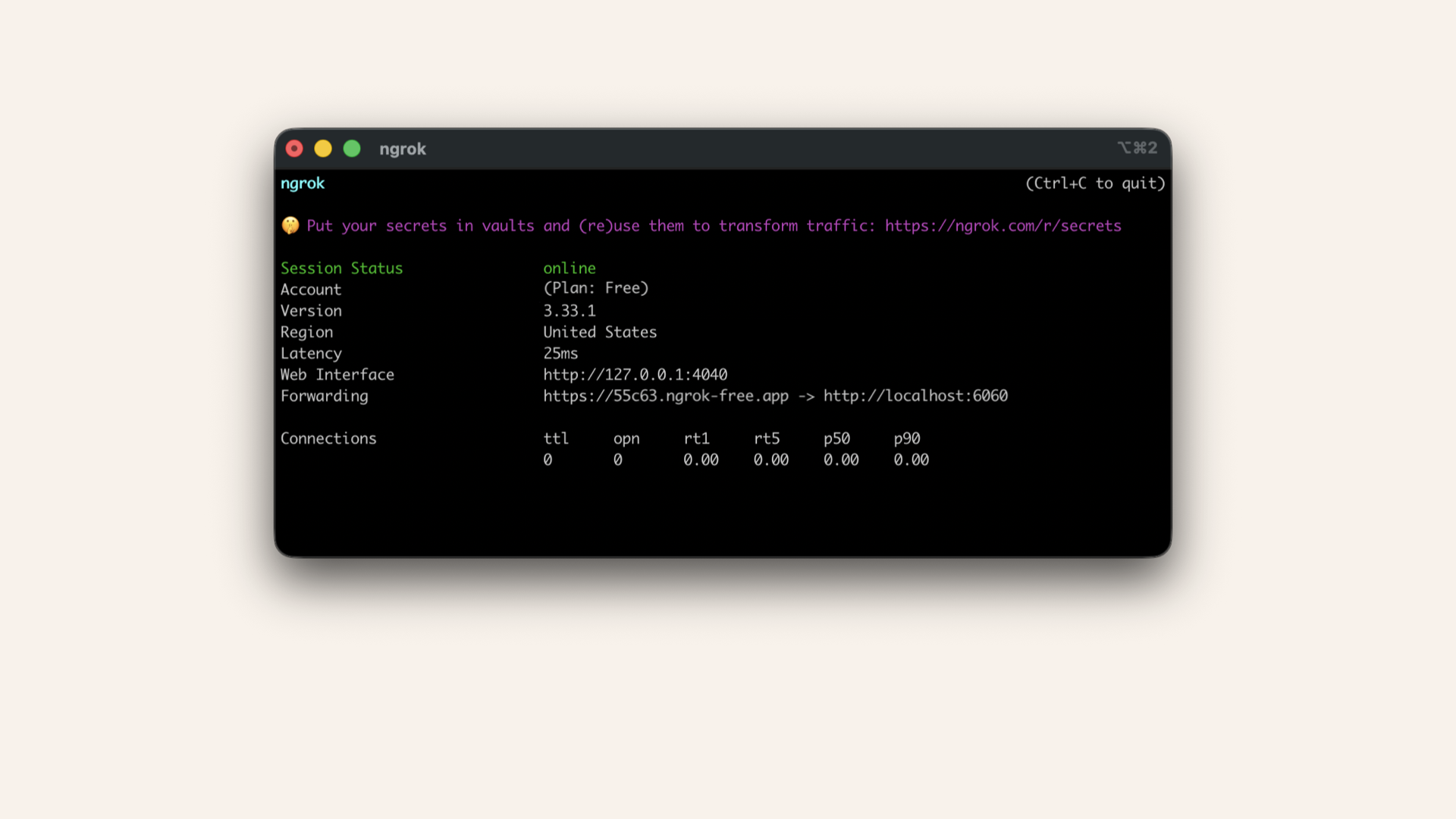
You'll see ngrok running in your terminal
If you restarted your computer, run it again in a new terminal window:
ngrok http 6060
If you restarted the ngrok tunneling, you'll have to update your .env with the new ngrok domain
.env again and add the new ngrok domain:NGROK_DOMAIN="YOUR_NGROK_DOMAIN"
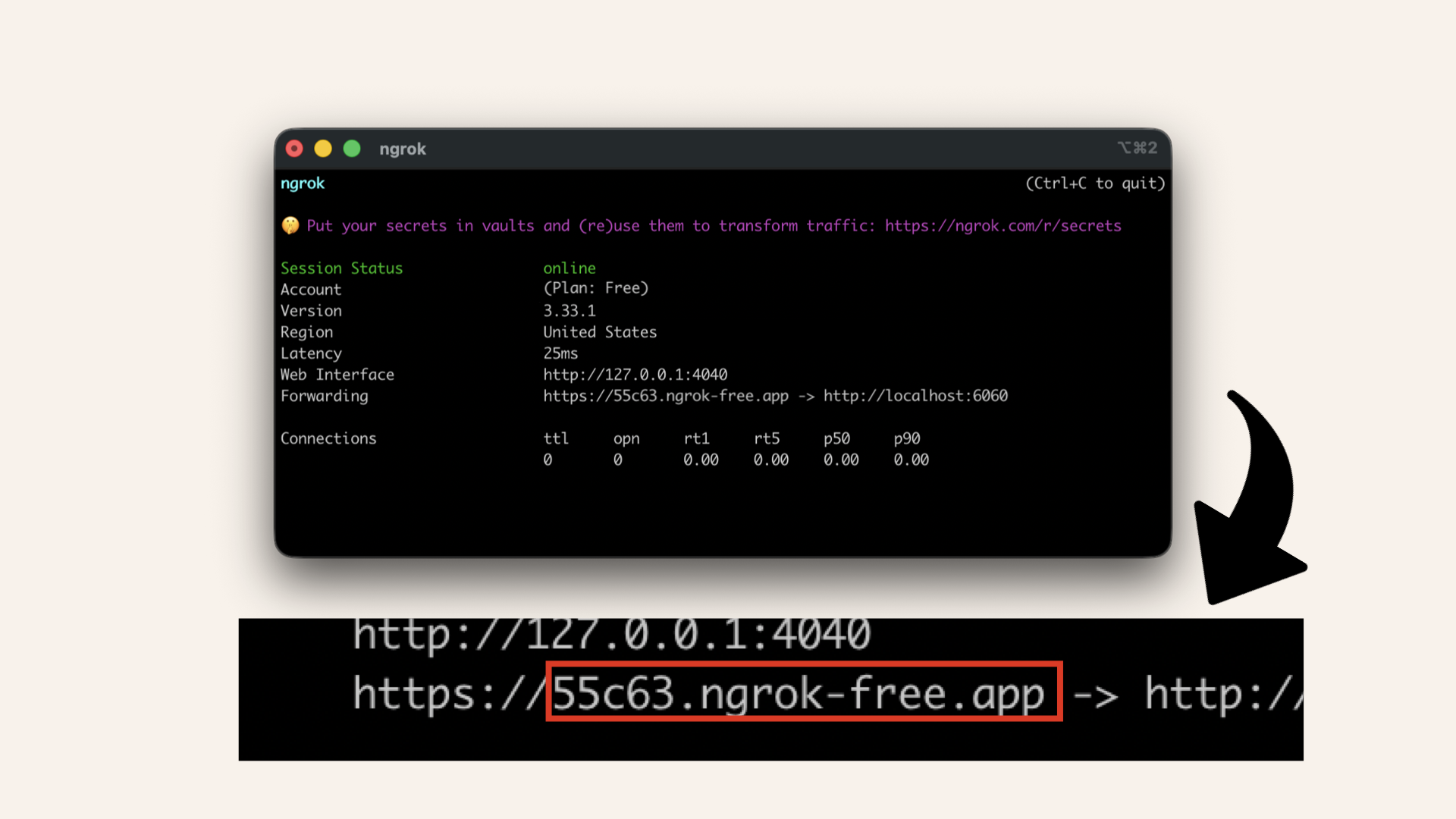
Copy the domain without https://
Step 3: Test the restaurant booking AI
Run this in your main terminal with an active virtual environment:python restaurant_caller.py +YOUR_PHONE_NUMBER
Replace +YOUR_PHONE_NUMBER with your actual verified number from Day 1 ↗
No virtual environment running?
Activate the virtual environment
- macOS/Linux
- Windows
source venv/bin/activate
.\venv\Scripts\activate
How to test it
When your phone rings:
-
You answer: "Hello, thanks for calling Mario's Restaurant!"
-
AI responds: "Hello! I'd like to make a dinner reservation for two people tonight around 7 or 8pm. Do you have availability?"
-
You say: "Sure! What time were you thinking?"
-
AI responds: "How about 7pm?"
-
You say: "Perfect! Can I get a name for the reservation?"
-
AI responds: "Yes, it's Alex."
-
You say: "Great! We have you down for 2 people at 7pm tonight under Alex. See you then!"
-
AI responds: "Perfect, thank you!"
Roleplay complete!
✅ Success check
If everything worked:
✅ Phone rang
✅ AI agent waited for your greeting
✅ AI agent requested a reservation
✅ AI agent handled your questions
✅ AI confirmed details
✅ Conversation felt natural
You just taught your AI agent to complete a real-world task.
Troubleshooting
Phone doesn't ring
Check 1: Is ngrok running?
In ngrok terminal window, you should see:
# Forwarding https://xxxxx.ngrok.app -> http://localhost:6060
You'll see ngrok running in your terminal
Check 2: Did you update NGROK_DOMAIN in .env?
Check 3: Is the number in E.164 format?
# ✅ Correct: +14155551234
# ❌ Wrong: 4155551234
Check 4: Is the number verified in Twilio?
Phone rings but no AI voice
Check 1: Look for this in main terminal window:
📞 Call connected: CAxxxxxxxxx
Check 2: Test your OpenAI API key:
Run:curl https://api.openai.com/v1/models \
-H "Authorization: Bearer $OPENAI_API_KEY"
Check 3: Visit ngrok's web UI at http://127.0.0.1:4040
- Look for WebSocket upgrade request
- Status should be 101 (Switching Protocols)
"Module not found" error
source venv/bin/activate  # macOS/Linux
.\venv\Scripts\activate   # Windows
pip install fastapi uvicorn twilio websockets python-dotenv
Phone rings but hangs up when you pick up
Check 1: Did you update NGROK_DOMAIN in .env after opening a new ngrok tunnel?
Copy the domain without https://
Check 2: Log in to your Twilio account, click on the Monitor tab, then Error logs:
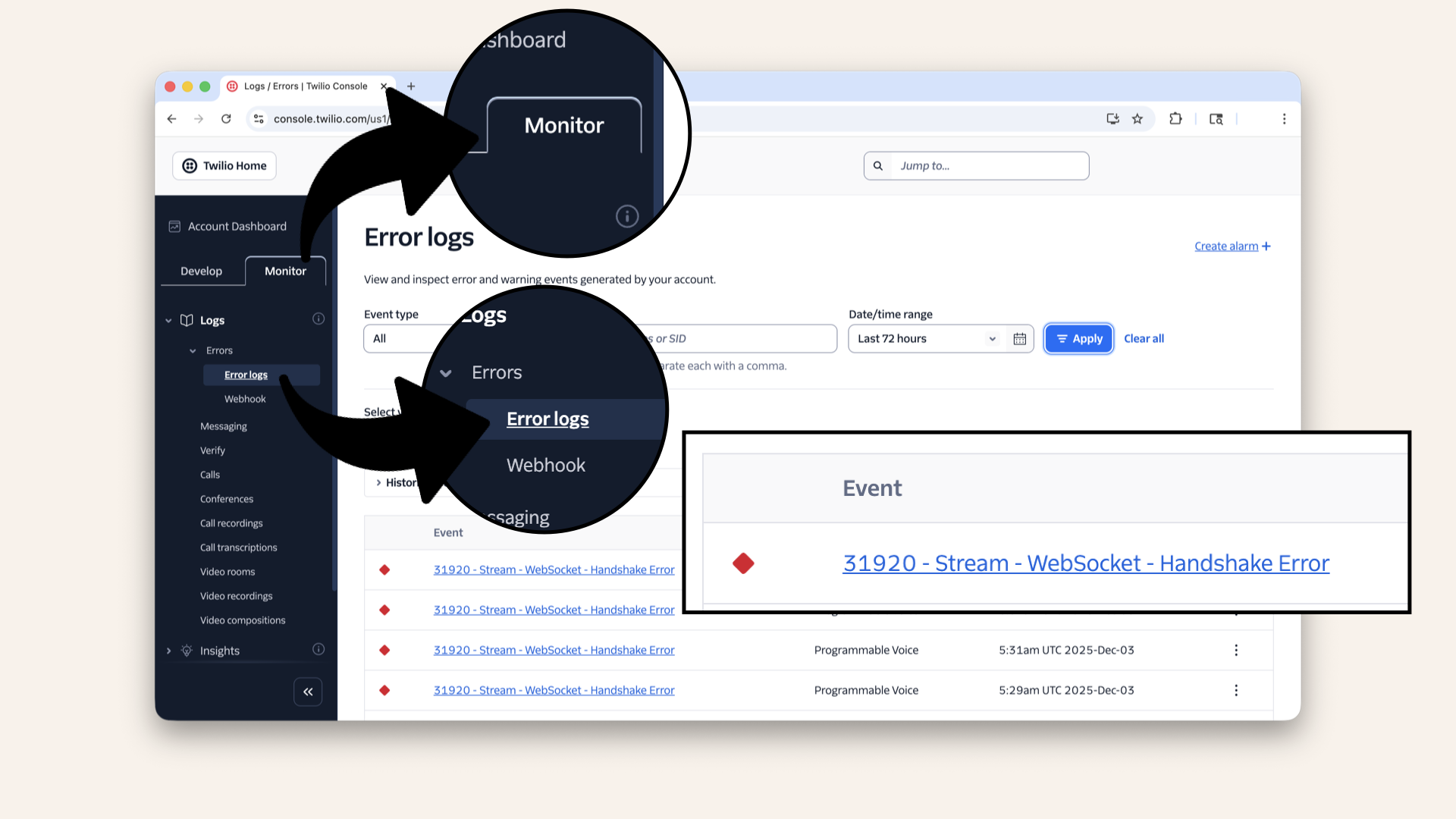
Log in to your Twilio account, click on the Monitor tab, then Error logs to check the error logs
Check 3: If the phone rings but immediately hangs up when you answer, the error Stream - WebSocket - Handshake Error likely indicates that the ngrok domain is incorrect.
Check your .env file
Try different scenarios
Want to test different situations?
Just change the initial prompt SYSTEM_MESSAGE on line 26:
# AI personality
SYSTEM_MESSAGE = (
    "You are an AI assistant making a dinner reservation on behalf of your user. "
    "You are calling a restaurant to book a table. Be polite, professional, and concise.\n\n"
    "The person who answers will greet you first (e.g. 'Hello, [Restaurant], how can I help you?'). "
    "Do NOT speak until you hear their greeting and they finish speaking.\n\n"
    "After they greet you, in your first turn, make a reservation with this info:\n"
    "- a dinner reservation for two people tonight"
    "- around 7 or 8pm"
    "Then wait for their response and answer any questions (party size, time, name = Alex, etc.). "
    "Confirm the reservation details before ending the call."
)
Doctor's appointment
SYSTEM_MESSAGE = (
    "You are calling a doctor's office to reschedule an appointment. "
    "Politely explain: 'Hello! I have an appointment scheduled for tomorrow, "
    "but I need to reschedule for later this week. What days do you have available?' "
    "If they ask for a name, say 'Alex'. "
    "Confirm the new appointment time before ending."
)
Retail store inquiry
SYSTEM_MESSAGE = (
    "You are calling a retail store to check if they have a product in stock. "
    "Ask: 'Hello! Do you have the iPhone 15 Pro in stock? I'm looking for the blue 256GB model.' "
    "If they say yes, ask about the price. "
    "Thank them before ending the call."
)
Calling a friend
SYSTEM_MESSAGE = (
    "You are calling your friend Sarah to invite her to dinner. "
    "Say: 'Hey Sarah! It's Alex. I'm planning a dinner party this Saturday at 7pm. "
    "Would you be able to make it?' "
    "Chat casually and confirm if she can come."
)
The beauty of Day 2: it's just prompt engineering.
No infrastructure changes. No new APIs. Just words.
What we learned today
1. The power of instructions
Generic prompts:
"You're a friendly assistant"
Task-specific prompt:
"You're booking a restaurant reservation. Wait for greeting. Then request 2 people at 7pm"
Result: AI knows exactly what to do and when.
2. Context is everything
Your new prompt told the AI agent:
- Role: "You are an AI assistant making a reservation"
- Situation: "You are calling a restaurant"
- Timing: "Wait for them to greet you first"
- Task: Request dinner for 2 tonight at 7-8pm"
- Details: "Name is Alex, confirm before ending"
3. Less code can be better
We didn't need:
- Complex function calls
- Initial conversation items
- Response triggers
We just needed:
- A clear, detailed prompt
- Trust that the AI would follow it
Tomorrow's preview
Today: You tested by answering your own phone.
Tomorrow (Day 3): We start building the AWS infrastructure so your AI agent can:
- Run 24/7 (even when your laptop is off)
- Handle multiple calls simultaneously
- Never go down when WiFi drops
- Scale to production
We're moving from localhost → cloud.
The reality check (again)
Today's setup still has problems:
❌ Requires your laptop running
❌ Requires ngrok tunnel
❌ Can't handle multiple calls
❌ Not production ready
Days 3-24: We fix all of this by deploying to AWS.
Share your win
Tested the restaurant booking? Share it!
Twitter/X:
"Day 2: My AI agent just called me and booked a (fake) restaurant reservation. It handled follow-up questions like a pro. This is wild. @norahsakal's advent calendar is 🔥"
LinkedIn:
"Day 2 of building AI calling agents: My AI successfully made a dinner reservation. Not with a demo - with real code I wrote and understand. Following Norah Klintberg Sakal's 24-day series."
Tag me! I want to see your tests! 🎉
Bonus: Try different voices
Want your AI to sound different?
Change the VOICE variable in restaurant_caller.py on line 38:
VOICE = 'alloy' # Change this voice variable
Test other voices:
VOICE = 'shimmer'  # Warm and friendly
# VOICE = 'alloy'   # Neutral (default)
# VOICE = 'echo'    # Confident and deep
Experiment! Different voices fit different scenarios:
- Restaurant booking? →
shimmer(friendly) - Doctor's office? →
alloy(professional) - Customer support? →
echo(confident)
Want the full course?
But if you want:
✅ Complete codebase (one clean repo)
✅ Complete walkthroughs
✅ Support when stuck
✅ Production templates
✅ Advanced features
Join the waitlist for the full course (launching February 2026):
Need help with deployment? Want to brainstorm your AI calling idea? Grab a free 30-min call ↗ - happy to help.
Tomorrow
Tomorrow: Day 3 - Create Your VPC (AWS Foundation Begins) ☁️
We're moving from localhost to AWS. First step: claim your territory in the cloud.
Read Day 3 ↗
See you then!
— Norah
Learning resources that helped me
This tutorial is inspired by Twilio's excellent guide on building voice agents with OpenAI's Realtime API ↗
I took their foundational concepts and expanded them to show you:
- How to deploy to production (not just localhost)
- How to build real-world use cases (restaurant booking, etc.)
- How to own your infrastructure (AWS from scratch)
If you want to dive deeper into Twilio's API, check out their docs at twilio.com/docs ↗
But this advent calendar? It's about taking that foundation and making it REAL.